Google Play

See All Stories
google play store

Before the unified Play branding, Google had the Android Market, Google Music, and Google eBookstore. Google decided to merge and rebrand its individual digital offerings into the Play Store in March of 2012.

The Play Store is now the default place to purchase apps, movies & television, music, books, and news subscriptions for all Android devices. The latter four offerings having their individual Android and iOS apps to watch, listen, and read purchased content. Most content can also be accessed through the web.

In April of 2016, the suite of icons were redesigned in a similar style to provide a consistent look across all devices and the web.

Google+ for Android updated with Android Beam and DayDream support

Site default logo image

This afternoon, Google has updated its Google+ app for Android with a couple of new features and enhancements (via Droid Life). First off, the app now supports Android Beam. This feature will allow for users to share photos from within the Google+ app to other devices via NFC. The app also now supports DayDream. This is feature, which has been available in some third-party apps for a while, is essentially a screensaver for devices while they are being charged or placed in a dock. Now that the Google+ app supports this feature, it will work with pictures stored within the app.

What’s New:

  • Photos now supports Android Beam, so you can share photos via NFC
  • Photos also supports Daydream, so you can view your pics in screensaver mode when charging or docking your device
  • Individual photo details are now available in the drop-down menu
  • Opening “Locations” will automatically refresh your friends’ locations on the map

This update is a staged rollout, which means it may take a little while for it to rollout to every device. Keep an eye on the Play Store to see if your device has received the update.

In addition to updating its Android app, Google has also enhanced cover photos on the web version of Google+. Now, cover photos will show the entire image, as opposed to just a select portion. Photos are still the same size, so you don’t need to change anything in order to enhance your profile. 

Site default logo image

Google’s App Translation Service now available to all developers

Back at Google I/O in May, the company announced some updates rolling out to its Google Play Developer Console with some of the highlights including beta testing, staged rollouts, and a new app translation service. After a successful pilot program, Google has announced on its Android Developers blog that the App Translation Service is now open to all developers:

To help developers reach users in other languages, we launched the App Translation Service, which allows developers to purchase professional app translations through the Google Play Developer Console. This is part of a toolbox of localization features you can (and should!) take advantage of as you distribute your app around the world through Google Play… You’ll be able to upload your app’s file of string resources, select the languages you want to translate into, select a professional translation vendor, and place your order. Pro tip: you can put your store listing text into the file you upload to the App Translation Service. You’ll be able to communicate with your translator to be sure you get a great result, and download your translated string files

Developers interested in purchasing translation services can find the App Translation Service at bottom of the APK section in the Google Play Developer Console. 

Google Glass will get stereo headphones and lots of new music features demonstrated by Young Guru

Site default logo image

http://www.youtube.com/watch?v=l5XoAkOuWdM

In its Explorer Story: Young Guru [through Google Glass], Google shows a lot of new features of the Google Glass upgrade and expected upgrades including the hardware addition of the stereo headphones.

We discussed Google Music hidden in the XE11 update yesterday but we’re seeing the Shazam type of song recognition, and some nice translation work as well.

Can’t wait! via


Expand
Expanding
Close

Editorial: Please save $100 and only buy the Nexus 5 from Google’s Play Store

Site default logo image

Look, don’t take this the wrong way as I’m not suggesting buying the Nexus 5 from your carrier of choice is a bad move, except that’s exactly what I’m saying. The thing is, it isn’t even the carriers fault as they are simply passing on their cost of the Nexus 5 purchase from LG/Google directly to you. Sprint and T-Mobile have both confirmed that their cost of the Nexus 5 is $450 indicating that Google is subsidizing their pricing of the Nexus 5 via the Play Store. Just like last year’s Nexus 4. 

Yes, there is an argument to be made that not having to fork over the entire up-front cost is something that could appeal to many potential Nexus 5 buyers. However, in the long run I’d rather see customers saving the extra $100 and putting it toward apps, accessories or paying the electric bill. It’s likely Google is taking the $100 loss in the hopes of pushing customers into the Play Store where they will grab apps, books, movies, magazines and all the other things Google will make a profit on. More Nexus users means more Google Maps and search use, more money, more money…

[Ed. note: If you want to save even more money, T-Mobile still offers a super secret Web only $30/month pre-paid plan (meaning little-no taxes) that works great with your Nexus 5.  You have to scroll to the bottom of T-Mobile’s plans page to find it—->.  It includes unlimited data (throttled at 5GB), unlimited texts and a sparse 100 minutes of talk time.  If you aren’t a talker, you are looking at $360 for a year of unlimited data + $350 for the best Android phone (under $60/month total) out there!]


Expand
Expanding
Close

T-Mobile’s Nexus 5 arrives Nov. 14 online, Nov. 20 in-stores for $450

Site default logo image

Today T-Mobile has made things official for availability and pricing on Google’s recently launched Nexus 5. Arriving for online orders Nov. 14 and in stores on Nov. 20, T-Mobile will be offering the 16GB Nexus 5 for $41.99 down with its usual monthly payments of $17. That brings the total cost of the device on T-Mobile up to $450, around $50 more than Google charges for the 32GB model and $100 more than the 16GB model on Google Play. That’s not unusual, however. Google has long subsidized the cost of its Nexus devices sold through Google Play.
Expand
Expanding
Close

Black 16GB Nexus 5 sells out in minutes as shipping times slip for other models

Site default logo image

Minutes after launching on Google Play, Google’s new flagship Nexus 5 smartphone is now officially sold out for some models as shipping times continue to slip for others in at least US.

The black 16GB model is now listed as sold out on Google Play, while the white 16GB model has now slipped to Nov. 8. For the black model, Google Play says that it is “out of inventory” and to “check back soon”.

The 32GB models of the device are still listed as shipping by in 1-2 business days.  Nov. 8.

Shipping times are also slipping in other countries. All models of the device are currently listed as shipping by November 8 in Canada.
Expand
Expanding
Close

Google releases Nexus 5 on Google Play for $349/$399, ships in 1-2 days

Site default logo image

http://www.youtube.com/watch?v=hQ0XTJqFLIE

As expected, the rumors indicated Google would be making a silent Nexus 5 announcement today and now the device is officially available on Google Play in the US. Lining up with previous rumors, the device will sell for $349 for the 16GB model and $399 for a 32GB model. Google is currently quoting an estimated shipping time of 1-2 business days.

Google says the Nexus 5 will officially go up for sale unlocked and without a contract in the following countries starting today through Google Play: U.S., Canada, U.K., Australia, France, Germany, Spain, Italy, Japan and Korea. It also notes that the Sprint, T-Mobile, Amazon, Best Buy and RadioShack will get carry the device soon alongside retailers in India.

Official specs for the device right from Google Play: 4.95″ 1920×1080 display (445 ppi), Full HD IPS and Corning® Gorilla® Glass 3, a 2.3GHz Qualcomm Snapdragon™ 800 processor, an 8MP rear facing camera, and a 1.3MP front facing camera. There’s also a 2,300 mAH battery, Adreno 330, 450MHz GPU, and Wireless Charging.


Expand
Expanding
Close

Site default logo image

Twitter for Android updated with in-line photos and Vine videos, quick-actions in the timeline


Twitter for Android was updated today with support for in-line photos in the main timeline view rather than using photo links. Vine videos now show up in the timeline as well, although it seems other video services will still require you to tap a link first.

The update also adds buttons to quickly reply, retweet, or favorite a tweet without having to swipe or tap it first. The new version of Twitter for Android is available for free in the Google Play Store now.

WIND Mobile launches Facebook sign-up page with specs for the unannounced Nexus 5

Site default logo image

Canadian carrier WIND Mobile has just posted a pre-registration form on its Facebook page for the still unannounced Nexus 5 (via MobileSyrup). The carrier touts the device as the “smart, new phone made to capture the moments that matter.” The registration page is lacking any concrete availability information, though it does list detailed specifications.

The carrier says that the Nexus 5 will feature a 4.95-inch 1080p display with Corning Gorilla Glass 3. It will pack a 1.3MP front-facing camera, as well as an 8MP rear-shooter. The device will be powered by a Snapdragon 800 processor paired with 2GB of RAM. As you would expect, it will also run the latest 4.4 KitKat version of Android and be available in 8GB and 16GB variants.

  • Screen: 4.95-inch 1920×1080 display (445 ppi) Corning Gorilla Glass 3
  • Cameras: 1.3MP front facing 8MP rear facing OIS
  • Weight: 130 grams
  • Dimensions: 69.17 x 137.84 x 8.59 mm
  • Operating System: OS Android 4.4, KitKat
  • Processor: 2.3GHz quad-core Qualcomm Snapdragon 800 processor
  • Wi-Fi (2.4G/5G) 802.11 a/b/g/n/ncNFC (Android Beam) / Bluetooth 4.0
  • Storage / Memory / Ram: 16GB or 32GB internal storage 2GB RAM
  • Ports & Connectors: microUSB, SlimPort enabled, 3.5mm stereo audio jack, Dual microphones, Ceramic power and volume buttons

Yesterday, an image of the Nexus 5 in white was leaked, along with a supposed launch date of November 1st. Earlier this month, the device even appeared on Google Play in a 16GB variant, priced at $349.
Expand
Expanding
Close

Upcoming Nexus 5 leaks in white, Nov. 1 launch date reported

Site default logo image

After leaking a clear image of the black model yesterday, prolific leaker @evleaks has posted a render of the upcoming Nexus 5 in a white color option. As can be seen in the image above, the white model is actually a two-tone device: a black front, a white back, and black accents around the sides and rear-camera system…


Expand
Expanding
Close

Latest YouTube update hints at upcoming background audio support

Site default logo image

While from the outside, the most recent YouTube update looked rather minor, Android Police has done some deep digging and discovered a couple of very interesting tidbits regarding future features coming to the app. First off, the APK file makes several hints at background audio support. This means that you will be able to start a video within the YouTube app and navigate to another app and not have your content disrupted. Currently, leaving the YouTube app makes your video automatically pause. Android Police notes that the feature should work when the device’s screen is off, as well.

Within the YouTube app now, the settings option for background audio is hidden, but Android Police managed to reveal the options for a very brief period of time. Regarding the upcoming offline feature, the APK teardown also revealed some of the dialogue messages users will be presented with, though they’re all pretty standard.

Background audio support will be huge for listening to music via YouTube, in addition to other things, such as podcasts and videos. It’s unclear when the feature will launch, but between this and offline video support, YouTube for Android is about to get a lot more useful.
Expand
Expanding
Close

Site default logo image

BlackBerry announces 5 million downloads of BBM for Android and iOS only 8 hours after release

BlackBerry revealed via the official BBM Twitter account that in the first eight hours since launching BBM for Android and iPhone, the app has been downloaded over by over 5 million customers across both platforms.

That number could actually be much higher, as the 5 million applies only to the number of users whose accounts have been activated for use. BlackBerry did not specify how many more users were still waiting to be activated, if any.

[tweet https://twitter.com/BBM/statuses/392474565059686400 align=’center’]

Leaked screenshots show updated Play Store app with slide-out navigation

Site default logo image

Over the past few weeks, everyone has been heavily focused on the forthcoming KitKat update and Nexus 5, but Android Police has obtained screenshots of something that should be rolling out to everyone soon. According to the site, Google is currently in the process of redesigning the Play Store, yet again. The changes will keep up with what Google has been doing to its other apps.

The biggest user-interface change comes with the new slide-out navigation panel, which is commonly referred to as “hamburger-style” navigation. In the current version of the Play Store, all of the options are put into a single menu in the upper right corner. With this Play Store update, the menu options will be reduced to just settings and help, while everything will move to the navigation panel.

  • Store home
  • My apps, My movies & TV, etc., (varies depending on what section of the Play Store you are in)
  • Shop (only appears at certain times)
  • My wishlist
  • Redeem

As far as release timeframe goes, Android Police expects the update to go live with Android 4.4 at the very minimum, but notes that it may go out earlier. It will compatible with all versions of Android back to Froyo. The blog also notes that the design is a work in progress and may very well change several times before release. 
Expand
Expanding
Close

Your name and face photo can be used in Google ads from 11th November unless you opt out

Site default logo image

Google has announced a change to its terms of service that will allow the company to use your name, photo and company endorsements to be included in ads from 11th November (via the NYT).

When the new ad policy goes live Nov. 11, Google will be able to show what the company calls shared endorsements on Google sites and across the Web, on the more than two million sites in Google’s display advertising network, which are viewed by an estimated one billion people.

If a user follows a bakery on Google Plus or gives an album four stars on the Google Play music service, for instance, that person’s name, photo and endorsement could show up in ads for that bakery or album … 
Expand
Expanding
Close

Site default logo image

HBO shows now being added to Google Play, Game of Thrones included

In an effort to further beef up its content selection, Google has just started adding HBO shows to Google Play. The ever-popular Game of Thrones, Newsroom, and True Blood are now available to purchase episode-by-episode or by season. Boardwalk Empire, Veep, The Wire, and Girls are also now available. Episode pricing varies from $1.99 to $2.99.

Season selections are unfortunately limited at this point, however. For instance, only season one of The Newsroom is available, while only the first two seasons of Game of Thrones are available. Hopefully, as time progresses, more seasons and episodes of these popular HBO shows will become available, but for now, check out the offerings on Google Play
Expand
Expanding
Close

Jelly Bean likely to be on majority of Android devices within a week or so

Site default logo image

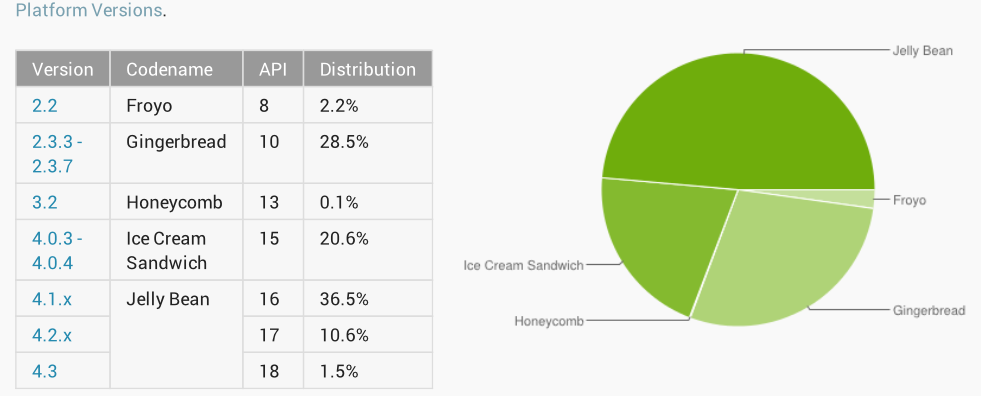
The latest Android stats from Google show that Jelly Bean is now installed on 48.6 percent of Android devices, and given current growth rates is likely to break the magic 50 percent barrier within a week or two. Jelly Bean became the most-used version of Android back in July.

The rather less impressive stat is that more than a quarter of devices – 28.5 percent – are still running Gingerbread, which dates back as far as 2010. It’s also worth pointing out that there are couple of fudge-factors in Google’s stats … 
Expand
Expanding
Close

Site default logo image

Facebook Android app now lets you edit posts and comments

Facebook is rolling out an update to its Android app today that brings a much welcomed new feature with the ability to edit posts and comments after sharing. Previously the only option was to delete and or repost a comment, but now users will be able to tap an arrow on each post and select “Edit post” to quickly make and save changes. You’ll also be able to see a history of changes.

The ability to edit posts and comments is rolling out today for Android and on the web.

The updated Android app also includes a few other new features. A full list of what else is new below:

-Use icons in status updates to express what you’re feeling or doing

-See upcoming events at a glance on your favorite Pages

-Create and share new photo albums from your phone

Site default logo image

Google Hangouts for Android gets status icons and more

Google is rolling out a new version of Google Hangouts today for Android that will bring a couple long requested features to the messaging service. On top of being able to see who is online with new green and grey icons next to contacts, Google is also making it easier to browse contacts and access invites:

– You can see who’s reachable right now on Hangouts. Green icons mean they are, and gray icons mean they aren’t.

– It’s easier to browse your contacts when starting a new Hangout. From top to bottom you’ll now see ‘People you Hangout with’, ‘Suggested People’, and ‘Other Contacts’.

– Hangout invites are now located above your conversations so they’re easier to find.

– Aaaand… you can hide people from the New Hangout screen by pressing on their name for a few seconds and touching ‘Hide contact.’

The update is hitting Google Play in the coming days as version 1.2.

Site default logo image

Google beginning to refund unused Google Offers

As noted by AllThingsD, Google has just started sending out notifications to customers letting them know that they will soon be receiving refunds for unused Google Offers. Offers, which are available through a standalone mobile app as well as the Google Maps and Google Wallet apps, used to force users to purchase coupons ahead of time, much like a Groupon service. Going forward, however, the Offers will act more like traditional coupons with users refunded the full cost of unused deals.

You’ll also be able an additional $4 if you opt for a Google Play credit:

An email from Google to an AllThingsD colleague this week gave her two options: Receive a refund for the full amount of two unused offers, or receive a Google Play credit for that amount, which never expires, plus an additional $4, which will expire in two years.

“Users can now easily discover and save Google Offers in the Maps app, Search, Wallet, and on sites around the Web, without having to purchase them in advance, so we’re refunding previously purchased offers that we believe haven’t been used,” a Google spokesperson said in an emailed statement to AllThingsD.

New York regulators crack down on fake online reviews, is Google Play next?

Site default logo image

The New York Times reports that New York regulators will today announce a new initiative that aims to crackdown on fake reviews online. They’ve already reached settlement agreements with a number of companies and issued fines of around $350,000 to companies purchasing and providing fake reviews, many of which are submitted to services such as Google, Yahoo, and Yelp. Fake reviews have always been an issue for Google Play and just about every mobile app marketplace, so perhaps regulators will soon extend their investigation to mobile app stores as well.

“What we’ve found is even worse than old-fashioned false advertising,” said Eric T. Schneiderman, the New York attorney general. “When you look at a billboard, you can tell it’s a paid advertisement — but on Yelp or Citysearch, you assume you’re reading authentic consumer opinions, making this practice even more deceiving.”

Regulators found that US Coachways, one of the companies included in the investigation, had hired freelance writers to write fake reviews on Yelp and other services:
Expand
Expanding
Close

Google Play Music update adds ability to create radio stations based on genre

Site default logo image

An update is rolling out to the Google Play Music app that bumps it to version 5.2.1204L. Notably, the update adds the ability to create new radio stations based on music genres. Previously, the radio functionality was only available for use by songs, artists, or your past listening history. It’s important to note, however, that an All Access subscription is required for unlimited radio use. Both iTunes Radio and Pandora have had the genre-based station feature for sometime now, so this is a much welcomed feature for Google Music.

Also new in the update is an improved download queue. Now, you have the ability to pause, resume, and cancel songs that are being downloaded at any given time.

  • All Access Genre Radio is here! Go to Radio or Explore, pick your favorite genre and enjoy unlimited radio based on the music you love.
  • New download queue that allows pausing, resuming and canceling

The update is available now on the Play Store
Expand
Expanding
Close

Roku for Android app allows streaming of video to set-top box – from some devices

Site default logo image

The latest Roku for Android app allows video as well as audio and photos to be streamed to a Roku set-top box – but only for a limited number of devices.

Play your video from select Android devices to your Roku player. Supported models include: Samsung Galaxy SIII, Samsung Galaxy S4, Nexus 4, HTC One, and Nexus 7 (2012 model). Video playback requires Android 4.0 or later … 
Expand
Expanding
Close

Site default logo image

Microsoft releases Xbox Music for Android with ad-free music streaming and cross-platform syncing

Microsoft released a brand-new Xbox Music app for Android this evening. The app features ad-free streaming from Microsoft’s massive song catalog, with custom stations built around specific artists, songs, or albums. These playlists can be synced to your other Xbox Music-capable devices, such as an Xbox 360.

The app requires an Xbox Music Pass to work, which comes in both free or paid varieties. The app description doesn’t state that a paid subscription is needed, but free accounts are limited to only ten hours per month after the first six months of use. Microsoft also notes that offline listening is coming in a future update.

The Android app is available now for free on Google Play.

A full list of features in the app via Google Play below:

***An Xbox Music Pass is required to use this app.***

Xbox Music brings you all the music you love, every way you want it. Now you can access your Xbox Music Pass on your Android phone, Xbox, Windows 8 PC or tablet, and the web.

Xbox Music Pass on Android features:

• Stream ad-free music from a catalog of tens of millions of songs
• Add songs, albums, and playlists to your Xbox Music collection and access them from other device
• Create playlists that sync across your phone, Xbox 360, PC, tablet, and the web
• Listen to music while using your Android phone
• Enjoy a rich visual experience for searching, viewing, and playing back music

MyGlass Android companion app now acts as remote control for Google Glass

Site default logo image

MyGlass, the companion app Google created to allow you to screencast your Glass view to anyone with an Android phone, has now been updated to allow it to control Glass, reports Engadget.

The move was in response to feedback from Glass Explorers that “controlling its UI via swipes, nods and voice commands can sometimes be… awkward” … 
Expand
Expanding
Close