Apps and Updates



Update: To be out of stock they appear.
Update 2: The Cardboard viewers are back in the store. I was able to get one as of 12PM PST.
As we come to the weekend before Star Wars: The Force Awakens arrives, the movie tie-ins are hitting even harder. The Google Store is giving away free Star Wars-themed Cardboard viewers to anybody who wants one…
The latest beta of the Google app adds a share icon to Now On Tap that doubles as a quick way to take and share screenshots of your current screen. While Now on Tap hasn’t been the most useful feature yet, most people will find this to be a very practical and nifty trick.


With Mailbox now decommissioned, the third party Android email app scene is a little more bleak than it was before. One company hoping to bring us a little joy is Yahoo. It recently updated its Yahoo Mail app to version 5.1.0 which (among other things) now includes support for Gmail. With it being an Android app, you’d assume that it should have Gmail compatibility from the outset. But apparently, Yahoo didn’t see it that way.
Gmail support is added to the pre-existing list of providers, including Outlook, AOL and Yahoo mail accounts. What’s more, you can search your inbox and archive messages just as you would with any good Google-supporting email client. Along with the ability to connect with Gmail accounts, version 5.1.0 also brings the option to select all messages in any individual folder for mass-deleting and moving. They’ve also made it easier to access different accounts and settings.
Here’s the change log posted to the Yahoo Mail Play Store page:
5.1.0:– Connect Gmail mailboxes to read, organize, search and respond to your Gmail messages within the Yahoo Mail app– Select all messages in a specific folder on your device – just tap on the select all icon in the upper-left corner when moving or deleting multiple messagesInterface improvements for account switching, settings, touch targets, and message list readability– TalkBack accessibility improvements– Performance enhancements
While Google has shifted its focus to Android Pay for contactless payments, Google Wallet has needed to reinvent itself somewhat as a peer-to-peer payment system. With the latest update, it’s become a whole lot easier to send money to your friends, family and contacts.
From today, the updated app on both iOS and Android will let you send money to anyone on your contact list, even if you don’t have their email address. You can send money to them using their phone number, and it’s secure and fast.
The Chromecast Audio was announced with the ability to basically replicate the functionality of a high-end Sonos system, but at a much cheaper price of $35. An update rolling out starting today further fulfills that with multi-room and Hi-Res audio support…


Yahoo today released a new “Yahoo Video Guide” app for mobile devices that acts as one central location for users to find content from across a long list of competitive video services and networks.
The app allows users to search from one place and then offers links to buy or start streaming the content in other apps like Amazon, Netflix, HBO GO, and many others. So you’ll still need to be a subscriber, have the app downloaded, and or purchase the content once the Yahoo Video Guide app redirects you.
And while you can just search for something you’re looking for, the app also has a Mood Picker feature that lets users pick a from GIFs to search through curated lists.
Yahoo of course has its own Yahoo Screen app for mobile devices, but it also links to content on iTunes, Amazon Video, Hulu, Netflix, HBO GO, ABC, FOX, CBS, NBC, Xfinity, YouTube, A&E, BET, Cartoon Network, Cinemax, Comedy Central, Disney, Food Network, and others. In total it says it’s promoting over 30 video services through the new Video Guide app.
The Yahoo Video Guide Android app is available to download for free in the US.

Back at Google’s big event in September, the company announced a new feature destined for Google Photos later this year: Shared Albums. This lets you invite friends and family to view albums that you create and add photos to, and you can optionally allow them to also add photos to these shared albums. As promised, Google will begin rolling out its new Shared Albums feature for Google Photos starting today.
When Pebble announced its new Pebble Time watches and (later on) the Pebble Time Round, it also released a brand new operating system for its popular wearable. This new Timeline was a drastic departure from its original user interface. Sadly, it was a UI only available to those with the new Time models, although the company did promise that the new OS would make its way to older devices too.


Modern ironies: a metro or train journey is one of those occasions when you have some time to catch up on your Facebook feed, but you often have no data connection or a very intermittent one. The company is currently testing a couple of features that should help.
The first is caching posts that have been downloaded but not yet viewed. When you’re offline, the app will display these posts.
We look at all the previously downloaded stories present on your phone that you have not yet viewed, and rank them based on their relevance. We also factor in whether the images for the story are available. This way we can immediately display relevant stories you haven’t seen yet, instead of showing a spinner while you wait for new stories.
Second, it will allow you to comment on posts even when offline, storing your comments in the app and then uploading them once you’re back online.
There’s no indication on when we’ll see the new features, but the fact that Facebook is sharing them suggests that they are likely to be introduced sooner rather than later.
Via Engadget. Photo Dado Ruvic/Reuters.
Historically, Chrome to Phone has been one of the most useful apps and extensions to be launched by Google. Using it, Android users could send links from web pages direct to their Android phone from the Chrome browser. It made its official entry in 2010 with the aim to bridge the gap between desktop and mobile. Earlier this year, Google announced that it would be discontinuing the extension.
As spotted by Android Police — to add the final nail to the coffin — the company has marked the Android app as [DEPRECATED] on the Play Store, and intends to shut it down by March 2016.
Chrome to Phone was launched in 2010 to help bridge your desktop and phone experience by making it easy to send Web links to your phone. Over the years, Google’s core products have evolved to be more integrated across different form factors. As of today, Chrome to Phone is deprecated. The app will continue to work until Mar 31st 2016 after which it will no longer work.
If you’re still using the service, there are several alternatives. One of which — of course — is Google’s very own Chrome tab-sync which synchronizes tabs across all of your devices with Chrome installed (assuming you’re signed in to all with the same account). Another third party option is Pushbullet which lets you sync notifications from Android to desktop, send SMS messages, share links and even remotely access files.
Google has highlighted new features for Google Drive apps today that it says make it easier to search for files on Android, iOS, and web.
Among the improvements to search in the app, you’ll now be able to narrow your search by file type and open advanced search from the search box. For iOS specifically, users can now get quick access to recent files and search from the Home screen icon using 3D Touch and the ability to search from iOS’s Spotlight feature.
Here’s a full list of improvements courtesy of Google:
Google says the improvements for Drive will roll out to the Android and iOS apps over the coming weeks.
Having announced its intention to do so earlier this year, Google is now rolling out its up-t0-6 person family plan for its popular music streaming service. Starting today, you can sign up to the Google Play Music family plan for $14.99 per month and you and your family can listen to as much music as you like without ads. Over the next few days, Android devices in the US, Canada, UK, Australia, France and Germany should see the option to sign up become available in the Play Music app.
Microsoft has been offering the Android version of its intelligent assistant Cortana as a small-scale beta since last month, and it’s now ready to go live. Engadget notes that it just hit Google Play.
Don’t expect it to match Google Now for functionality, however – with Google’s own assistant deeply embedded into Android and Cortana a mere app, it will have limited capabilities, but you can at least see how it compares when it comes to answering questions …
Just when you thought Pushbullet couldn’t get more useful, the company has updated its popular cross-platform app to include remote file browsing. With the new update you’ll be able to access files on your phone from your computer, or vice-versa, even if you don’t have one of the devices with you. It’s a pretty great feature if you’re known to accidentally leave your phone at home, or leave a file on your work computer that you need at home…

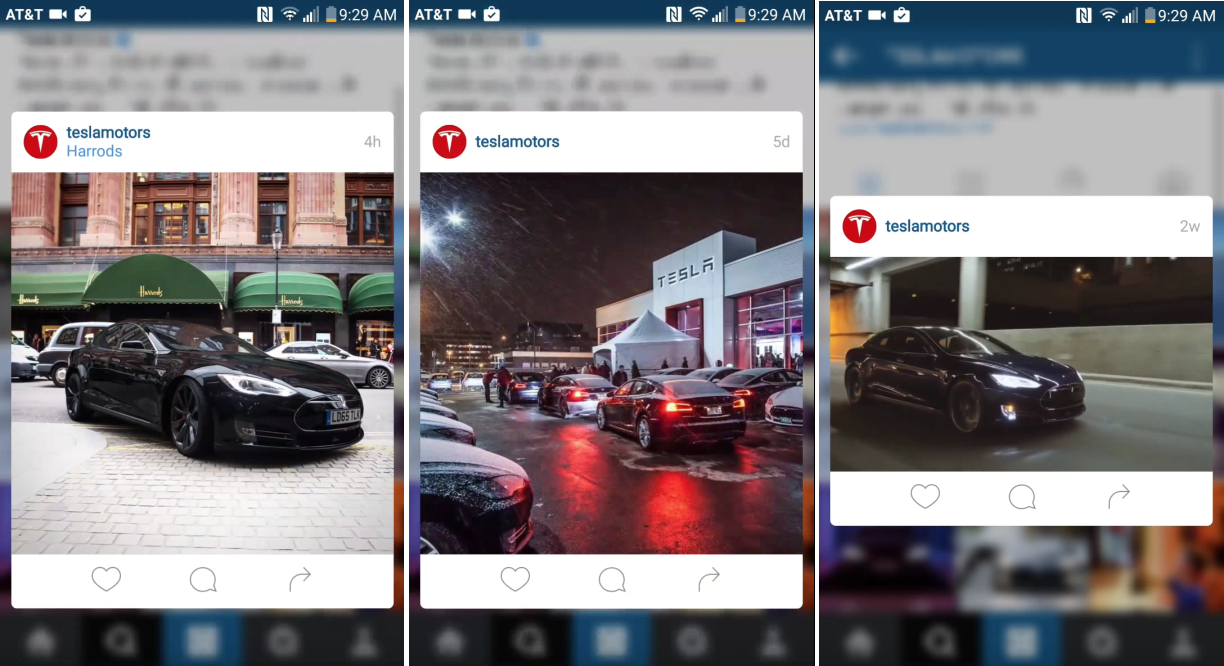
Update: Just like the multiple account support that disappeared mere hours after it appeared, this awesome 3D Touch feature is now gone.
Instagram for iOS has had 3D Touch features for quite a while, but it looks like the Instagram team wanted to experiment with bringing some of these to Android as well. While the latest version for Android obviously doesn’t take advantage of force sensitive hardware (which doesn’t really exist of this side of the mobile space anyway), it does add a nifty new pop up for quickly liking, commenting, and sharing posts…
If you’re using a smart TV running Android TV or using a set-top box like the NVIDIA Shield TV, you’ll be glad to know the launcher has been updated to include a much-needed feature. With the latest software version, you’ll be able to reorganize apps on your home screen so they’re laid out exactly how you want them to be.
Expand
Expanding
Close

Google has updated its Authenticator for Android app with support for Android Wear, allowing you to see authentication codes on your smartwatch.
The new app includes a developer preview of a ‘tap to authenticate’ feature that will allow users with NFC-equipped devices to simply tap one device to another instead of typing in a code. Google already offers a USB security key as an alternative …
Expand
Expanding
Close
If, like me, you grew up in the 90s there’s a very good chance you came across a certain strategy PC game called Age of Empires. In it, your mission was to explore territory, build your kingdom, defeat enemies and make allies. In a lot of ways it was similar to Sid Meier’s Civilization franchise, and it was awesome…
Snapchat Support has tweeted that it is aware that many users are “experiencing loading issues,” and says that it is working on a fix.
[tweet https://twitter.com/snapchatsupport/status/674156829551783940 align=’center’]
Users are variously reporting that they cannot login, load content or upload to the service.
The Android app got a boost back in the summer, with extra emoji and a travel mode designed to save data usage when roaming.
Google is extending their Safe Browsing feature that protects desktop users from malicious exploits on the web to mobile in Chrome for Android. Launched eight years ago, the feature has protected a billion desktop users from malware, unwanted software, and social engineering sites according to Google.
The feature was rolled out a long time ago as part of Play Services 8.1 and Chrome for Android 46, but was just officially announced today. It is enabled by default and users can check that it’s on by going to the Privacy menu in Chrome’s settings. When users come across an unsafe webpage, a bright red warning screen with a return to safety button will pop up first.
The team behind the feature notes the difficulties of bringing it over to mobile from desktop, mobile’s most limiting constraint being limited data and reduced data speeds. As such, every single bit of security data sent to the device is optimized. For instance, as social engineering attacks only happen in certain parts of the world, only devices in those regions will get those types of warnings. The security feature is also optimized from a memory and processor usage standpoint, making sure it does not reduce battery life.

via <a href="https://dribbble.com/shots/1617252-Facebook-Android-L-Experiment" target="_blank">Dribbble</a>
Shortly after Dropbox announced it had shut down its popular Mailbox and Carousel apps, Facebook has made a similar move by removing a handful of its apps from the Google Play Store and shutting down the division that created them.
Facebook’s Creative Labs project was intended to promote the creation of apps like Snapchat competitor Slingshot, and has launched several apps with some success. However, the social site has apparently decided that the time has come to shutter that initiative and the apps it has produced.
In a new blog post today, Dropbox has announced the shuttering of the Mailbox app it acquired in 2013, along with the Carousel photos app that launched last year. The beta build of Mailbox for Mac has not seen an update in quite some time, while the iOS version had been left to stagnate, leading many to believe this was the case already, but today’s announcement finally confirms it.
Dropbox says that the reason for the shutdowns was that company had “increased our team’s focus on collaboration and simplifying the way people work together.”
Today Google Calendar for both Android and iOS gains a handy new Reminders feature that works alongside the app’s to-dos feature.
With the Reminders feature, users will be able to keep track of to-do lists across Google platforms including Inbox, Google Keep, Google Now, and Calendar.
Here’s how the new reminders work:
You might already create calendar entries to remind you to call the doctor or pick up groceries on the way home. But while those entries come and go, Reminders stick with you over time so you can track them until they are actually done. If a Reminder isn’t completed, it will appear at the top of your Calendar the next day. And the next. When you do finally call the doctor or pick up those necessities, just swipe the Reminder away … and you’re onto the next to-do.
And since the reminders work across Google apps, you can create them from Inbox, Google Keep, Calendar, and even using Google Now voice commands: “Ok Google, remind me to buy birthday candles.”
The new Reminders feature for Calendar on Android and iOS is rolling out this week. Google says it will come to the web apps in the near future. The updated Google Calendar app for iOS also adds 3D Touch to create events or reminders.
At least as of its latest 3.1.021 version, it appears that Google Camera only works with Nexus devices. This is according to a new requirement listed on the app’s Play Store description and testing we’ve done with a non-Nexus Marshmallow device. Previously, as of version 2.5.052, the app was compatible with most phones running a relatively current version of Android. Does the addition of this requirement mean that Google is done updating the app for non-Nexus devices?