Stay up to date on news from Google headquarters. Be the first to learn about plans for Android, Google Plus, Google Apps, and more!
Stay up to date on news from Google headquarters. Be the first to learn about plans for Android, Google Plus, Google Apps, and more!

Keep up with the best gear and deals on the web by signing up for the 9to5Toys Newsletter. Also, be sure to check us out on: Twitter, RSS Feed, Facebook, Google+ and Safari push notifications.


We first told you about the Blocks modular smartwatch earlier this year when we reported that the company had been in talks with Google about a potential partnership with the Ara team for cross-platofrm modules. A few months have passed since Blocks demoed their prototype at CES in January, and today they’re out to show the world the latest developments — and in just a few months, it looks like they’ve come a long way…
Expand
Expanding
Close


Google this evening has started rolling out an update to the stable channel of Chrome OS that bumps it to version 43.0.2357.81. The update brings a handful of new features that are certain to please Chrome OS users. First off, Chrome OS can now autofill credit card information from Google Wallet to browser fields that ask for such information. Other browsers, such as Safari on OS X, offer features similar to this.
More than a year ago, Google became one of the first tech companies to share data on the diversity of its workforce, and now it has released an updated version of the data. In a post on Google+, the company revealed some of the changes that it has made to improve diversity and the results of those changes. Last month, Google revealed plans to spend more than $150 million on diversity initiatives over the next year.
Keep up with the best gear and deals on the web by signing up for the 9to5Toys Newsletter. Also, be sure to check us out on: Twitter, RSS Feed, Facebook, Google+ and Safari push notifications.
Cue the “Google+ is dead” jokes, and the following “was Google+ ever alive?” remarks.
Google has today removed the link to users’ Google+ profile from the top its many web properties, most notably its front search page and Gmail web app. Previously, names appeared with a plus in front like “+Stephen” and would link to your Google+ profile. From today, it looks like Google is making the name label no longer a link, and moving the “+Stephen” Google+ link to the app drop-down menu…
Expand
Expanding
Close

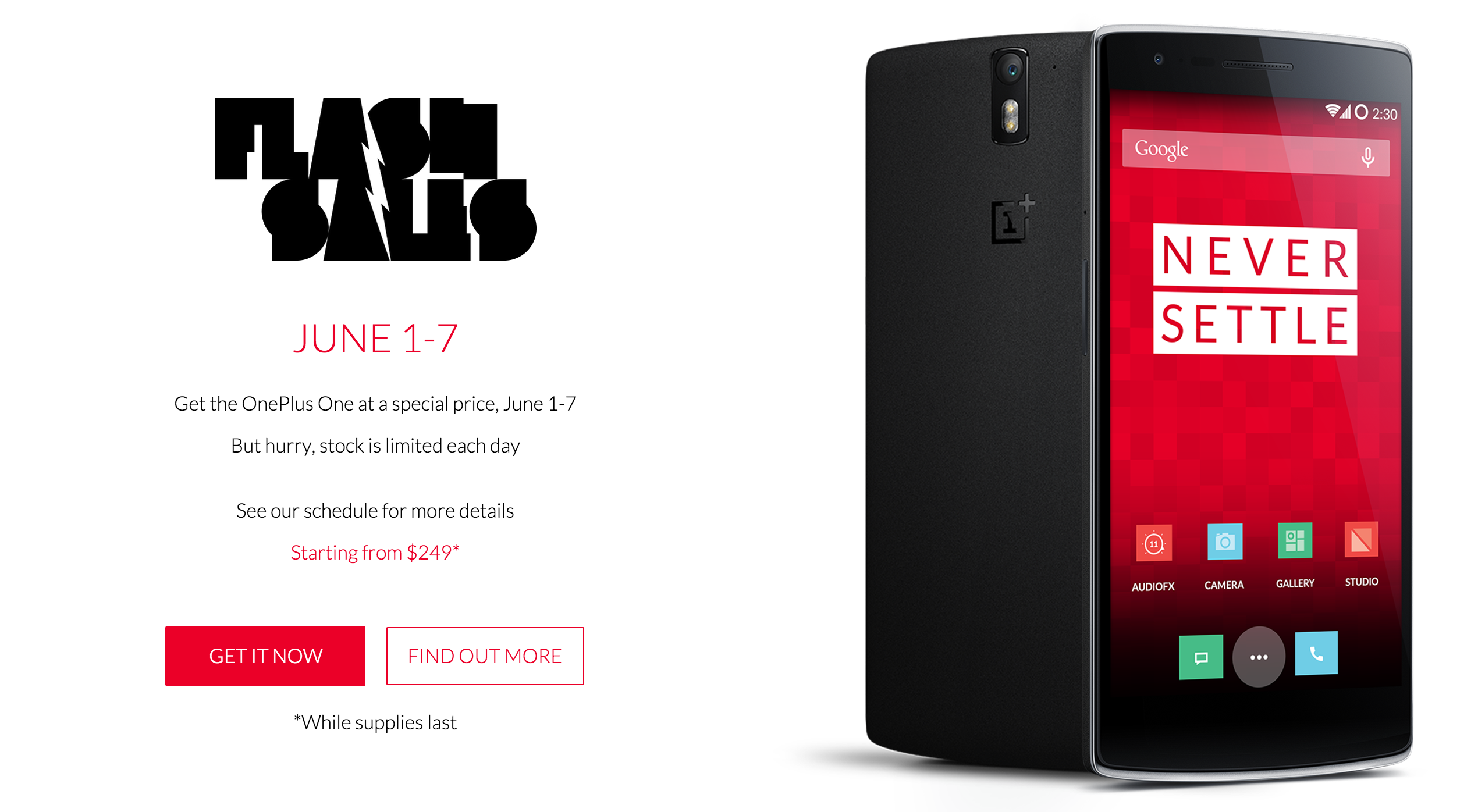
We can’t be sure whether or not this was what OnePlus meant when they said they’d “shake up the industry” on June 1st, but either way the company is holding flash sales on the OnePlus One at different times today through this Sunday, June 7th.
Here’s the full schedule of the next times the sale will go live:
June 2 – 2:00 GMT (10 pm EST -1 day)
June 3 – 12:00 GMT (8 am EST)
June 4 – 2:00 GMT (10 pm EST -1 day)
June 5 – 12:00 GMT (8 am EST)
June 6 – 2:00 GMT (10 pm EST -1 day)
June 7 – 12:00 GMT (8 am EST)
During the flash sales (devices may go fast, so you’ll have to be quick) OnePlus is offering the 16GB Silk White OnePlus One for $249 and the 64GB Sandstone Black model for $299. That’s a pretty good steal for a solid alternative to the Nexus 6, which was priced unusually higher than its Nexus predecessors.
OnePlus long ago confirmed that they were working on the OnePlus 2 and said it was slated for “sometime in 2015,” but that’s all we know about that device.
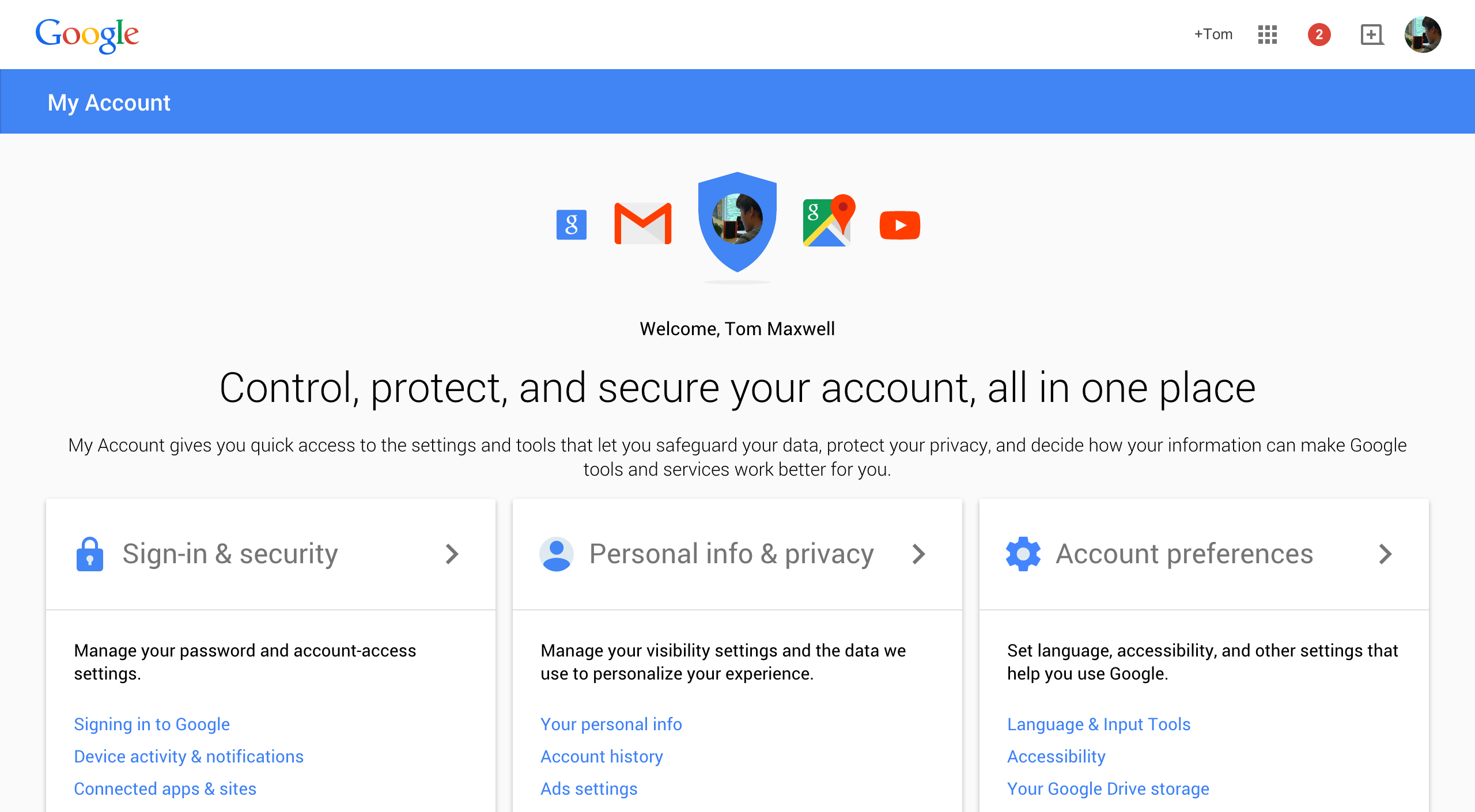
The last time we saw Google’s accounts settings page receive a fresh coat of paint was last December when the company brought it up to date with the new Material design language, and it seems they’ve gone ahead and updated it again recently.
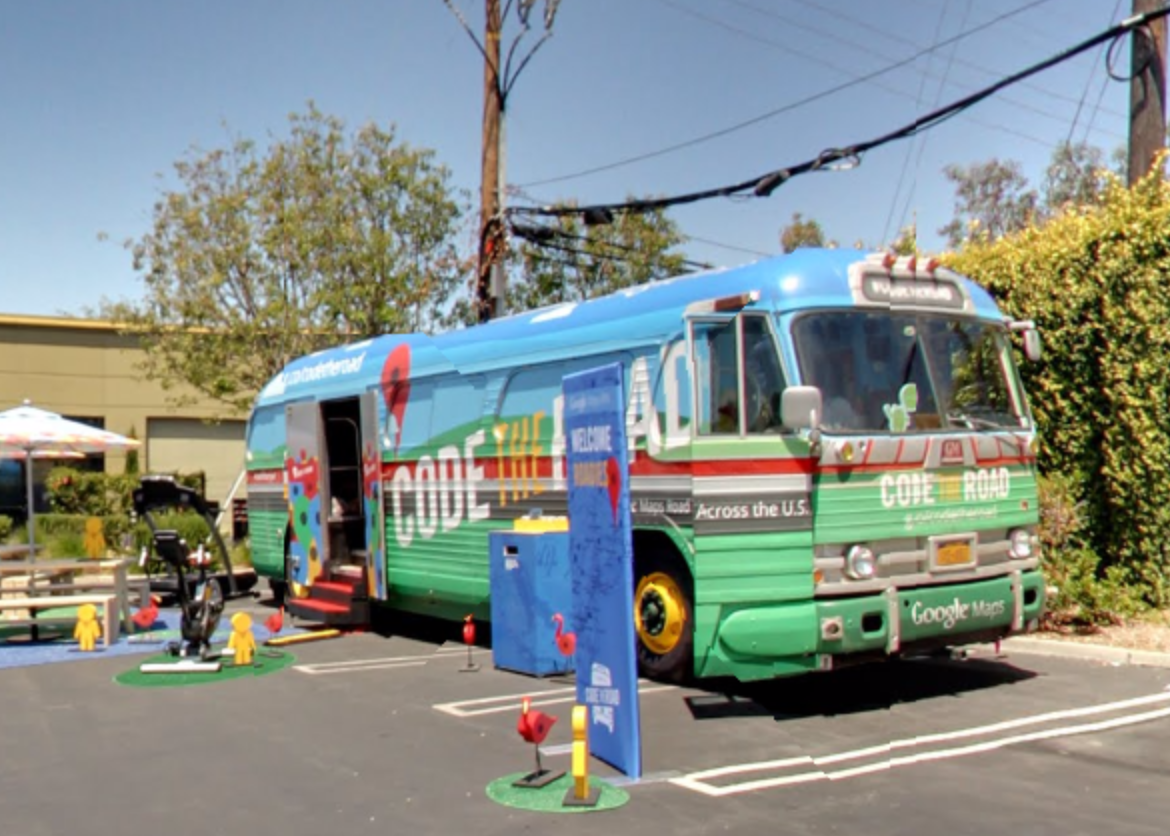
Google may have found itself in hot water recently over spam and offensive content finding its way into Google Maps, but the team behind the mapping service isn’t letting that stop them from celebrating its 10th birthday.
Starting yesterday at Google I/O and culminating in a final “celebration of coding” at Disney World on June 26th, the Maps team will be making its way across the country in a customized 1959 GM tour bus, stopping in 10 places along the way to hold developer meetups, show off apps built using the Maps API, and even make an appearance on Sesame Street. Stops will be in Utah, Colorado, Wisconsin, Illinois, New York, Virginia, Georgia and Florida.
If you’d like to check out the bus on one of its stops (anyone is welcome to), there’s a website up where you can find all the information you’ll need.

Google Photos was just announced this week, and—assuming you’re okay with Google having all of your photos on their servers—it’s a great new way to keep all of your life moments safely stored in one place. This isn’t just a redesigned mobile app. It’s a complete rethinking of how Google approaches its photo storage offerings, and it already has me convinced to just throw every picture I’ve ever taken to their cloud…
Expand
Expanding
Close
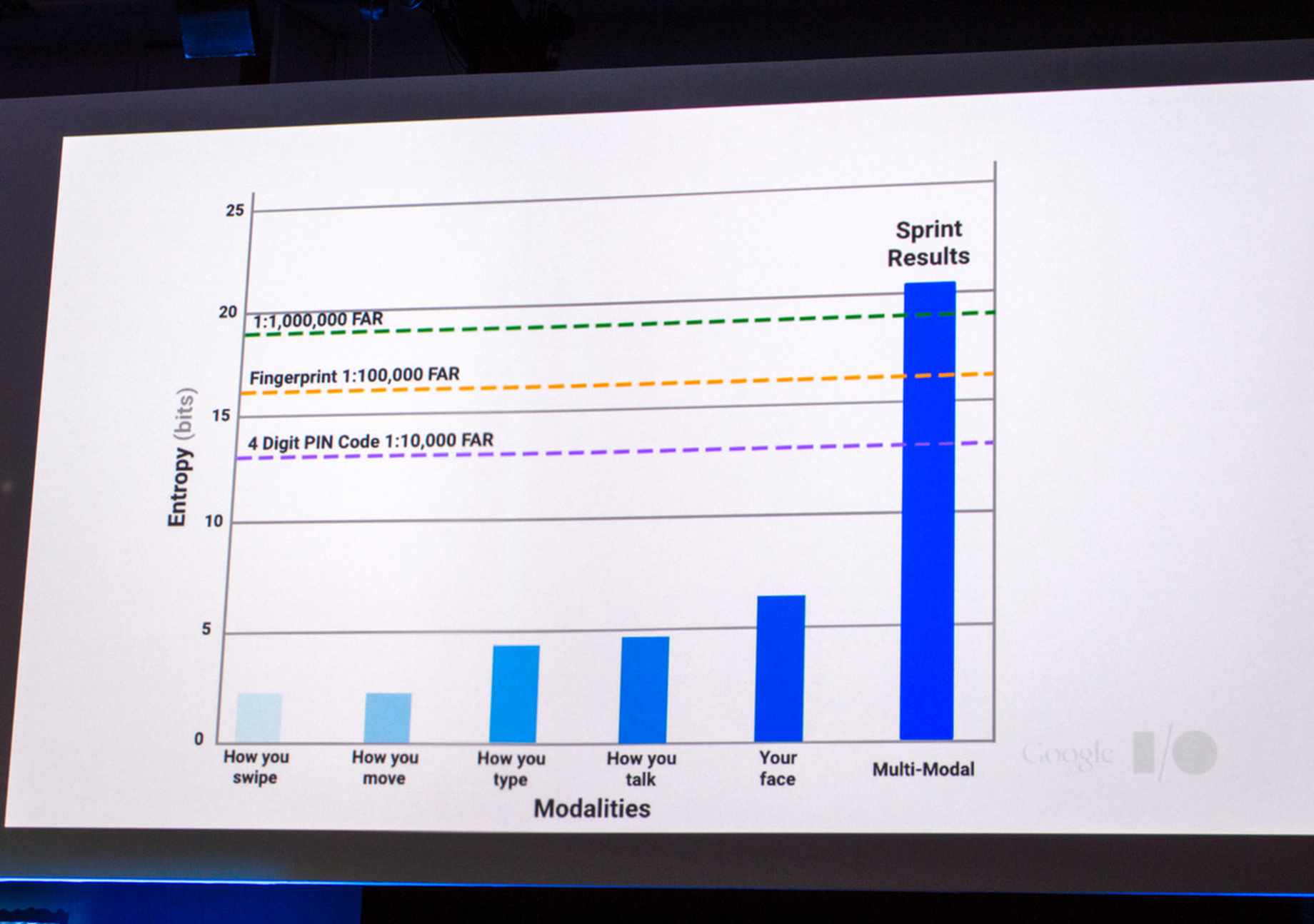
Google’s Advanced Technology and Projects (ATAP) group has been on a tear at I/O these past two days, demoing lots of new and interesting innovations that may one day hit production and make all of our lives much, much better. One of such projects is Project Abacus, which is seeking to all but eliminate the use of passwords for authentication.
Put simply, our smartphones can collect a lot of information about how we go about our day – how fast we walk, how well we type using our phone’s keyboard, how we talk – and the ATAP group thinks that using this data for authentication is 10x safer than fingerprints, and 100x safer than 4 digit PIN codes. They think that because, well, they’ve gathered lots of data on it – the company has been running trials of Project Abacus since last year in partnership with 33 universities and in total has collected 40 terabytes of data across 28 different states. They did not, however, say how much more secure they are than old-fashioned email and password combinations.
While Abacus runs in the background on your phone and collects data about you, it is constantly calculating a trust score that is basically a score of how confident it is that you are who you say you are, the owner of the phone. When you launch an app, take Netflix, if Abacus can successfully verify your identity, you’ll be logged in automatically. If it is unable to get a high trust score for you, Abacus will revert back to asking for a password. ATAP also says that different apps could theoretically require different trust scores – a banking app would most certainly want a higher trust score than that of a game.
Project Abacus doesn’t totally eliminate passwords but it’s one step closer, and makes total elimination of them a logical conclusion. And anything that will further mitigate the risk of intruders accessing my digital life is fine by me. When the world is putting this much energy into obfuscating away old-fashioned passwords (don’t forget Smart Lock Passwords) you know their time is up. A world that runs on these highly secure trust scores is on the horizon, I can feel it.

ATAP’s Project Soli and Project Jacquard are two of the more exciting announcements to come out of Google I/O, and while Soli didn’t have any impressive demos on the show floor, Google’s advanced technology and projects group had some touch-able fabric out for us to give Project Jacquard a test run. So we did, and we grabbed a quick video…
Expand
Expanding
Close

For one reason or another, roughly 4.4 billion people around the world are still without reliable, consistent access to an Internet signal. Google’s mission since its very founding has been to “organize the world’s knowledge,” but that isn’t so easy when vast amounts of information can’t even get online, which is one reason why its Project Loon balloons for spreading Internet by hot air balloons exists. The technology giant has made a lot of progress since announcing the project to the public in 2013, with recent tests seeing the balloons travel over 5,000 miles and provide hours of connectivity to locations that had otherwise never seen it before. Today Google is sharing two improvements that it has introduced to the project.
The first is that the team has created a 50-foot launcher called Autolauncher which cuts take-off time down to 15 minutes from 45 previously. The cube-shaped unit (pictured above) does this in a couple ways: it provides tall canvas sides to block winds up to 15 MPH (winds of 6 MPH or greater are prohibitive to take-off), it clamps down the balloon into place until take-off, and it provides a perch for the antenna which provides Internet so as to prevent it from swinging and setting the balloon off its trajectory.
The second improvement to Project Loon is that the balloons can now communicate with one another. Previously to beam Internet to the ground each balloon needed to be within 50 miles of the ground station of a telecommunications company that it would gain its LTE spectrum from. Now, however, the balloons can be anywhere from 250 to 500 miles from a station because balloons closer to a ground station can pass high-frequency signals between each other. This is the same idea as neighborhood mesh networks, where cheap routers can communicate with each other, share WiFi, and continue to communicate with each other even if the public Internet goes down. As a result, Google can now provide Internet to an entire region like West Africa with fewer expensive ground stations than before.
The hope now is to successfully provide a few days of continuous service at a time within its test areas (wind has proven to be a big challenge to doing this), and once it overcomes the challenges to accomplishing that it wants to roll out service to underserved markets such as Africa, Latin America, and Southeast Asia, ideally by the end of 2016.
Earlier this month, details regarding Google’s upcoming “hackable” headquarters in Mountain View emerged, suggesting that the building will be built partially by “crabots.” The crabots are a mash-up between cranes and robotic machinery and will be used extensively in designing the interior of the company’s new headquarters. The Sillicon Valley Business Journal now reports that Google has submitted plans at Mountain View City Hall for these headquarters. The translucent domed building is expected to be 595,0000-square-feet and located near the company’s existing headquarters.
One major barrier to adoption of new hardware and software solutions in the workplace is a top-down requirement that all communications are encrypted, secured from the prying eyes of today’s brazen hackers. It’s the reason why there are still thousands of businesses out there shockingly still issuing Blackberry phones. With more and more consumers and companies alike clamoring for a bring-your-own-device future, how can employees ensure their devices are as secure as chief information officer’s would like? Google has an idea.
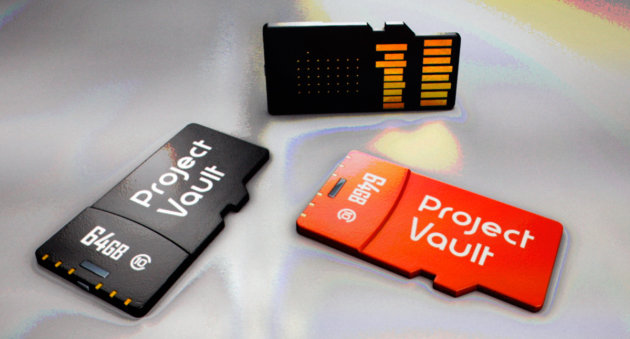
Project Vault, shown off today at Google’s I/O conference, is a microSD card with full operating system, ARM-based processor, NFC chip, and antenna packed inside of it. Oh, and 4GB of storage. While that’s pretty incredible in and of itself, what really makes this microSD card special is that the OS it runs is known as a Real Time Operating System (RTOS), and is packed with a suite of cryptographic solutions for keeping data secure and messaging with others using Project Vault microSD cards encrypted. An RTOS is different from the operating systems most of us are used to (i.e. Unix) that can’t run every process we throw at them simultaneously but switch between tasks rapidly, ensuring at the very least that the computer is still responsive to its user (i.e. doesn’t freeze). Real-time operating systems have stricter deadlines to complete the tasks that are thrown at them.
The main function of Project Vault will be super-secure messaging so hackers, or the NSA, cannot snoop (which also explains why Vault uses an RTOS – all resources are dedicated to encrypting and sending/receiving messages quickly). The encryption only works when both the sender and the receiver are using Project Vault SD cards, however, but it’ll work on any device with a microSD slot – so laptops, smartphones, tablets, etc. are supported. Google says the microSD card can also be used to encrypt video and as an alternative to passwords (where the card could generate cryptographic key pairs and store them securely). The company has an SDK up on Github for it that developers can use to build applications for the new project. Maybe the next Snowden will send confidential documents to journalists using his smartphone?
We told you yesterday that Google’s ATAP team is working on a couple new projects dubbed Soli and Jacquard, and today the group of self-proclaimed “pirates” came out to officially announce (and demo) them both on stage at their much-anticipated Google I/O session. They’re both about reimagining how we interact with technology, but both projects attempt to do so in different ways…
Expand
Expanding
Close
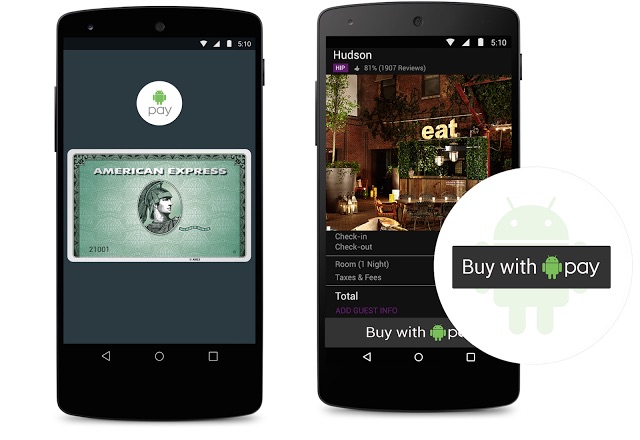
The newly-announced Android Pay is pretty cool – it allows you to pay at retail stores and inside mobile apps without having to take out your wallet or punch a bunch of card details into your glass-screened phone. But the logical conclusion to reducing the friction of paying for things is not tapping my phone against an NFC reader, but rather just not having to take out my phone at all! Well, without the same fanfare that was given to Android Pay, Google said they’ll have a solution for just that.
Update: Google is holding an “Ask the Experts” session today, June 3rd, at 2PM PDT where Sebastian Thrun, Peter Lubbers, and Jocelyn Becker from Udacity and Google will be answering user-submitted questions about the Android Nanodegree program. The Q&A session will be live-streamed on YouTube and there’s also a form where you can submit any questions you may have.
Yesterday Google’s Sundar Pichai said on stage at the company’s I/O conference that 8 out of every 10 phones that shipped worldwide last year were running Android, and that 600 million new smartphone users came online over the past year. That’s a lot of devices running the company’s smartphone OS, and they really want developers to realize the potential of their apps reaching that many people. So much so that they spent over $4 million developing an extensive Android development course in partnership with Udacity.
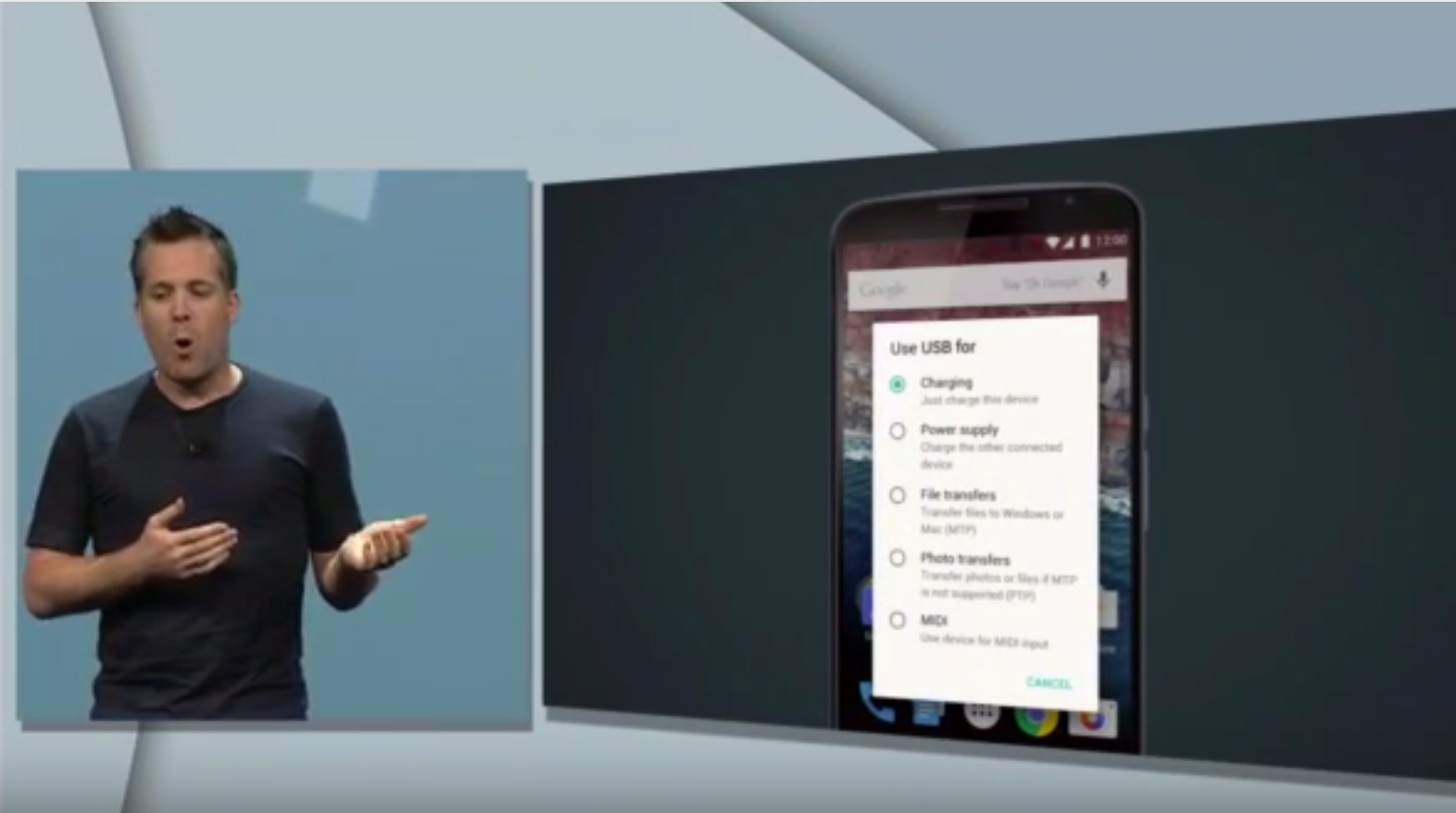
Android VP of Engineering Dave Burke’s presentation on Android M yesterday saw quite a few huge new additions coming to the OS from granular app permissions to improved battery standby management and, of course, Android Pay (check out our roundup). But one thing that might have got lost in the noise for some of you was Google’s newfound embrace of the USB Type-C standard and what it will actually do for you in practice.
USB Type-C is both flippable and bi-directional. That first attribute means that you won’t have to fiddle in the dark with plugging the USB cable connector into your phone the right-side up, because there isn’t a right-side up with Type-C.
More interesting, though, is the bi-directional ability of USB Type-C and Android M’s new interface support for it. What this means in theory is that, while this wouldn’t be practical, you could connect your Android phone to your laptop and charge your laptop with your phone instead of the other way around. You can also send files in either direction as was obviously possible before, but the new interface you see above for managing all these abilities in one place looks quite convenient.
Finally as you might be able to make out from the image above, Google is ready to welcome in more musicians with the warm embrace of MIDI support. This is big because while because 5.0 Lollipop brought support for some audio devices like USB microphones and amplifiers, it left out a lot of musical instruments that use the MIDI standard to send data back and forth between other devices. Maybe this will encourage more musicians and music app developers to consider Android again.
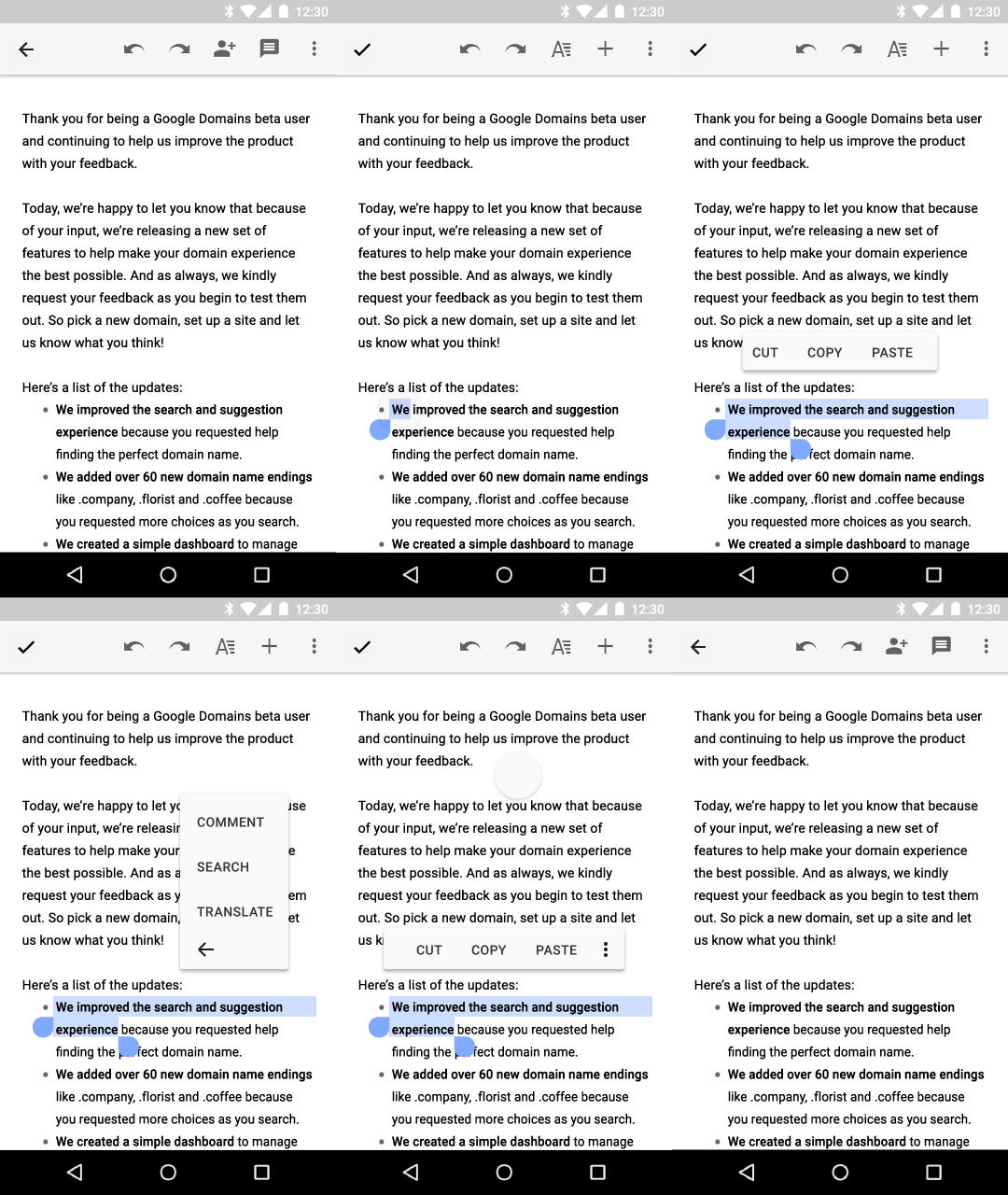
There was a lot to digest in today’s Google I/O keynote but one small, interesting new behavior change of note going into Android M is a new text selection floating toolbar, as you can see in the GIF above.
Whereas in the past primary actions of Cut, Copy, Paste, as well as other app-specific actions related to selecting text would probably be saved for a contextual action bar (an example of which is below), developers who want to keep their apps up-to-date with platform changes will now utilize this new toolbar which appears just above the text selection area. As you can see above, pressing the More icon will reveal a secondary menu where developers can add their own extra actions; the company in its design documents provides the example of Share, Search, and Translate actions appearing within the secondary menu in Gmail.
Another interesting system behavior change in Android M is a battery management tool called “Doze,” which we detailed in our Android M roundup, that disables most background activities when the OS detects that the device has gone unused for an extended period of time. The company says this has resulted in upwards of 2x longer standby time for Android devices running M versus those running Lollipop.
Originally revealed at Google I/O 2015 earlier today, Google Play Services 7.5 adds a handful of new capabilities for developers to take advantage of. In an effort to further break down what’s new in Play Services 7.5, Google has published a blog post detailing all of the new features. First off, Play Services 7.5 adds Smart Lock for Passwords. This feature builds on the Chrome Password Manager and adds a new API and UI for Android users that saves credentials for later use on other Android devices and browsers.
We’ve already done a roundup of the core changes coming in the next big release of Android, simply called “M,” so you should check that out. But we haven’t yet covered what additions and changes Android M brings to Google’s Internet TV platform, Android TV.

Dodocase has long been a supporter of Google’s Cardboard initiative, and at I/O this morning a variety of new features were announced concerning the VR platform. Dodocase has now revealed two new virtual reality viewer designs this evening following Google’s announcements earlier. Dodocase is now offering the G2 Viewer and the P2 Viewer for $24.95 each.
Hidden among the other news announced at Google I/O today, Google has also added the ability for developers to use the Google Maps API directly on Android Wear. The feature, which comes as part of Play Services 7.5, aims to offer users a wearable-designed Google Maps experience and was detailed in a blog post.