Apps and Updates



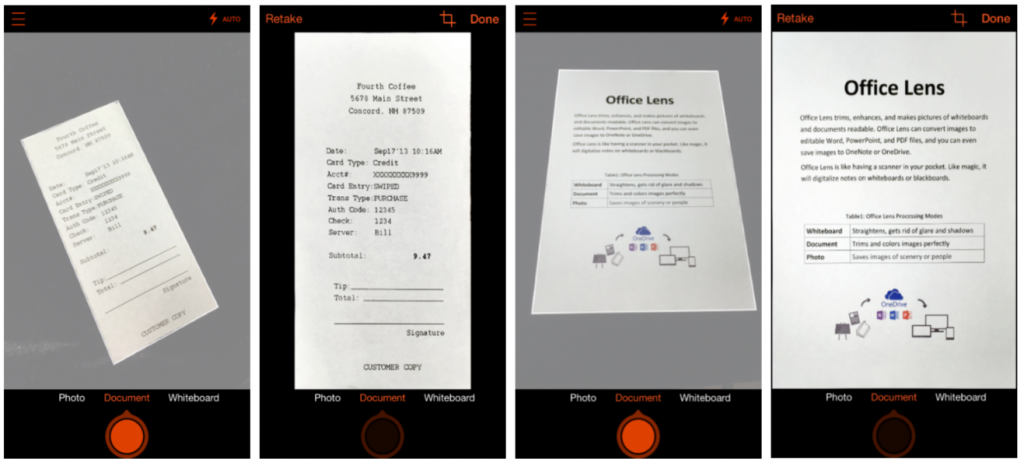
Microsoft is bringing its OneNote scanner app called Office Lens to Android after first launching on Windows Phone a year ago. Office Lens is similar to other on-the-go scanner apps letting you use your Android smartphone camera to capture information from receipts, documents, and other information around you. Office Lens is different, however, because it’s connected directly with OneNote, Microsoft’s cloud-syncing notebook service.

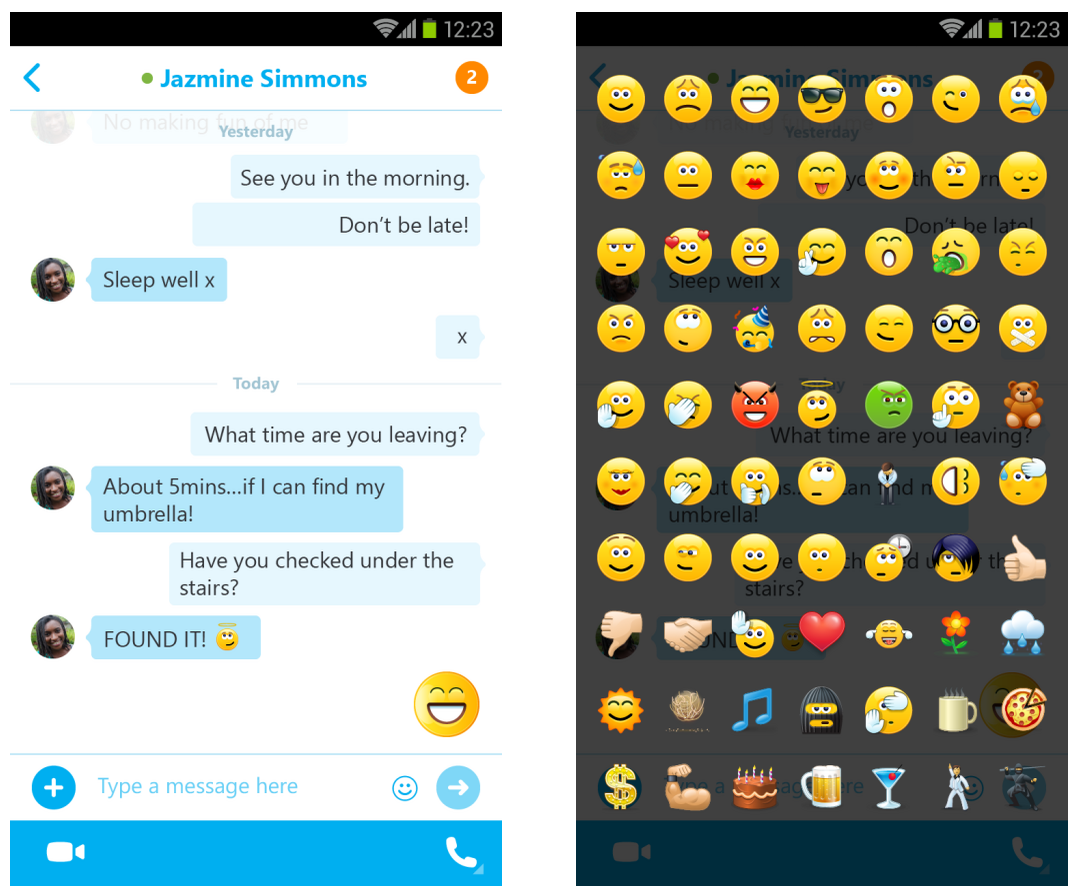
Skype today released an update to its Android app, version 5.3, which introduces new features that bring the Android version more up-to-date with features recently released for iOS and desktop users.
Among the new features, Skype 5.3 for Android includes an updated UI with chat bubbles, which looks much like the Skype experience already on other platforms.
The update also includes large and animated emoticons, emoji support, and other performance and user experience enhancements.
Expand
Expanding
Close


Google has announced today that a useful new feature is coming to Inbox by Gmail, namely the ability to customize morning, afternoon and evening “Snooze” times. Once you have the update, all you have to do is open the app, slide left on an email, tap “Pick date & time,” and select the time you’d like to snooze to. You should see a prompt at the bottom of the app asking you if you want to make this your morning, afternoon, or evening time.
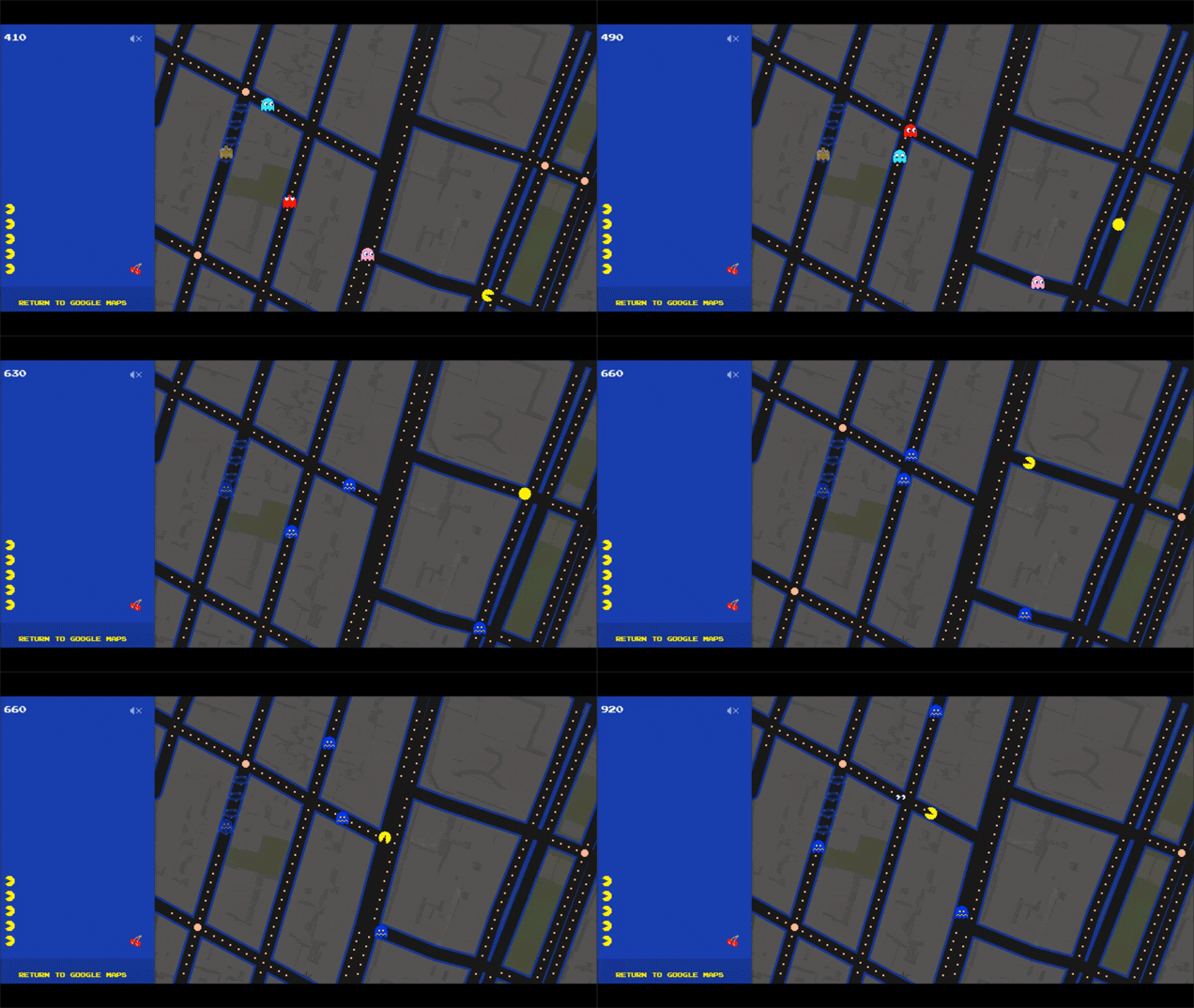
Google has started the April Fools Day fun a bit early with a new Pac-Man easter egg allowing users to play the classic arcade game on the streets of Google Maps. Here’s how to do it:
Expand
Expanding
Close

It’s been a long time coming for voice calling in WhatsApp. The company decided on an extremely dragged out rollout of the much-anticipated feature, but now it appears that anyone using the latest version of WhatsApp for Android has access to calling as many friends as they would like…
Google announced today that a new version of Gmail is now available, featuring several notable enhancements. First up, you’ll notice that the new version brings the oft-requested ability to view all of your mail in one place; just tap “All inboxes” and you’ll get a look at all of your email across added accounts. This is probably the most monumental change here, but there are a few other minor updates as well…
These days, many of us have more than one email address. If you’re a student, you may have one account for school, one for a campus group you lead, and one for your blog. If you’re a parent, you might have one for family and one for your business. However many email addresses you have, today’s improvements to the Gmail app for Android make it easy to manage all your mail from all your accounts (yes, even @yahoo and @outlook) while you’re on the go.
Messages from Yahoo, Outlook.com and other IMAP/POP accounts now have the familiar stacked conversation view (as has previously been available for Gmail conversations only), search has been updated with better auto-complete, and the app also has some nifty updated animations. Finally, you’ll find larger attachment previews and the nifty ability to “save to Drive with a single tap.”
You can grab the Gmail app on the Play Store for free as usual, and you should start seeing the update rolling out if you haven’t received it already.


Plex today has pushed an update to its Android app that bumps it to version 4.0. The update continues to improve the user interface of the application. Plex for Android gained a few Material Design inspired qualities with its last update, but with today’s 4.0 update, the design has been significantly enhanced.
Google today has reveled an update to its notes/lists app Keep. The update adds two notable features and is rolling out now to the Keep web client and Android app. With the update, the Android app is bumped to version 3.1. With it, the update brings recurring reminders and labels to both the web and mobile.
During its F8 Developer Conference today, Facebook announced a new Facebook Messenger Platform that will allow third-party apps to integrate with its popular Messenger app.
Expand
Expanding
Close
Google has today released a new app called “Cloud Console” in beta, and it brings a convenient mobile management console to those who have solutions running on Google’s Cloud Platform.
Among the app’s highlighted features, you’ll find the ability to check the status of Google App Engine and Compute Engine resources, create custom dashboards to get a “glanceable overview” of your solutions, take action from your mobile handset like stopping virtual machines, and view and manage incidents in Google Cloud monitoring.
Here’s the official description:
The Cloud Console enables you to manage your solution running on the Google Cloud Platform directly from your Android phone or tablet:
* Check the state of your Google App Engine or Compute Engine resources
* Create your own custom dashboard to get a glanceable overview of your solution
* Take quick actions directly from your device such as stopping a virtual machine
* View and manage Incidents tracked in Google Cloud monitoringWe plan on shipping new features regularly. Please give us your feedback in the app by swiping from the left and tapping “Send feedback”.
You can get the app for free on the Play Store.
Update: The app has now been officially announced:
Imagine being away from your desk and receiving automatic alerts when an issue occurs in your Google App Engine app. Or waiting at the airport and stopping your test VMs before leaving for vacation. With the beta launch of Cloud Console for Android, managing Google Cloud Platform from your phone or tablet is possible (and yes, an iOS version is in the works).
OpenTable announced today that it’s bringing its Pay with OpenTable feature to Android users allowing those booking reservations to also pay for meals using the app.
For participating restaurants, you’ll now be able to pay your check with a few taps inside the OpenTable app after adding your credit card.
“Millions of diners use our apps to discover and book the perfect table,” said Jocelyn Mangan, OpenTable Senior Vice President, Product Management. “We’re excited to provide Android users with a payment experience that is intuitive and integrated into the OpenTable app they know and love.”
The feature is only available in select cities and restaurants in the US, but OpenTable is always adding new additions to the list of supported locations.
The Pay with OpenTable feature is available through the latest version of the OpenTable app for Android on Google Play.
Microsoft announced today that it’s expanding partnerships with Samsung, Dell, and other manufacturers to get its suite of mobile productivity apps onto more Android devices.
Expand
Expanding
Close
Instagram today released a new app called Layout that lets users easily stitch together multiple photos by automatically generating layouts to make a collage of sorts. The company said the app is coming soon to Android.
Expand
Expanding
Close

[youtube=https://www.youtube.com/watch?v=BXxfhBbt3eY]
Google has worked with a gender equality campaign group to raise the profile of achievements by women in both its Field Trip app and future Google Doodles, reports TNW.
The campaign group SPARK (Sexualization Protest: Action, Resistance and Knowledge) pointed out to Google that its doodles featured women only 17% of the time, prompting the company to promise to do better in future and to add notable women from history to its Field Trip app.
Field Trip was first launched by Google back in 2012, as a background app that alerts you to interesting things around you as you travel. The original vintage UI was replaced by a Material Design refresh earlier this year. The app is also available on Google Glass.
If you want to take advantage of the new alerts, you need to check the Spark: Women on the Map option in the app. Field Trip so far features only 100 women, but anyone can nominate someone they feel should be included, suggesting that it may quickly grow.
Google tends to push several updates to its apps in the middle of the week, and this week has been a particularly eventful one. Updates have landed over the last 24 hours for several apps in Google’s Android inventory, including Inbox, Google Docs (Sheets and Slides, too), YouTube, Quickoffice, Google Maps, and Google Play Music.

From 9to5Toys.com:
The Amazon App Store is celebrating its Birthday by offering over $105 worth of paid Android apps for free. While there are a number of standout titles in today’s sale, Kingdom Rush Origins is one of our top picks from the bunch. Regularly listed at $1 (as much as $3.50), the game has received a 4+ star rating from well over 30,000 reviewers, much like the rest of the Kingdom Rush series.
 Other popular Android titles gone free in today’s sale include Guardians of the Galaxy: The Universal Weapon (Reg. $3), Cut the Rope (Reg. $1), Five Nights at Freddy’s 2 (Reg. $3), World of Goo (Reg. $5), Servers Ultimate Pro (Reg. $9), Business Calendar (Reg. $5), and more.
Be sure to keep an eye on our daily roundups for all the best game and app deals across every platform.

HTC updated the hardware of its Dot View case for the recently announced HTC One M9, but the app that powers the case has also now been updated—meaning that users of the HTC One (M8) Dot View case will also be able take advantage of some sweet new features.
The update packs the ability to play games on Dot View, notably one called “Dot Breaker” that looks a lot like the brick breaker games of old. You can also use Dot Message, which will display a message made of dots scrolling across the screen. Finally, the update packs new animated themes, a “special surprise” on your birthday, and a few practical enhancements to make the overall Dot View experience better: You can now control the flashlight and voice recorder, snooze alarms, and more.
Here’s the full changelog:
More interesting:– Play games on Dot View– Display a scrolling message on Dot ViewMore appealing:– Try the new animated themes– Receive a special surprise from Dot View on your birthdayMore practical:– Turn on your speaker during a phone call– Control the flashlight and voice recorder– Snooze alarms– Enjoy more notification icons
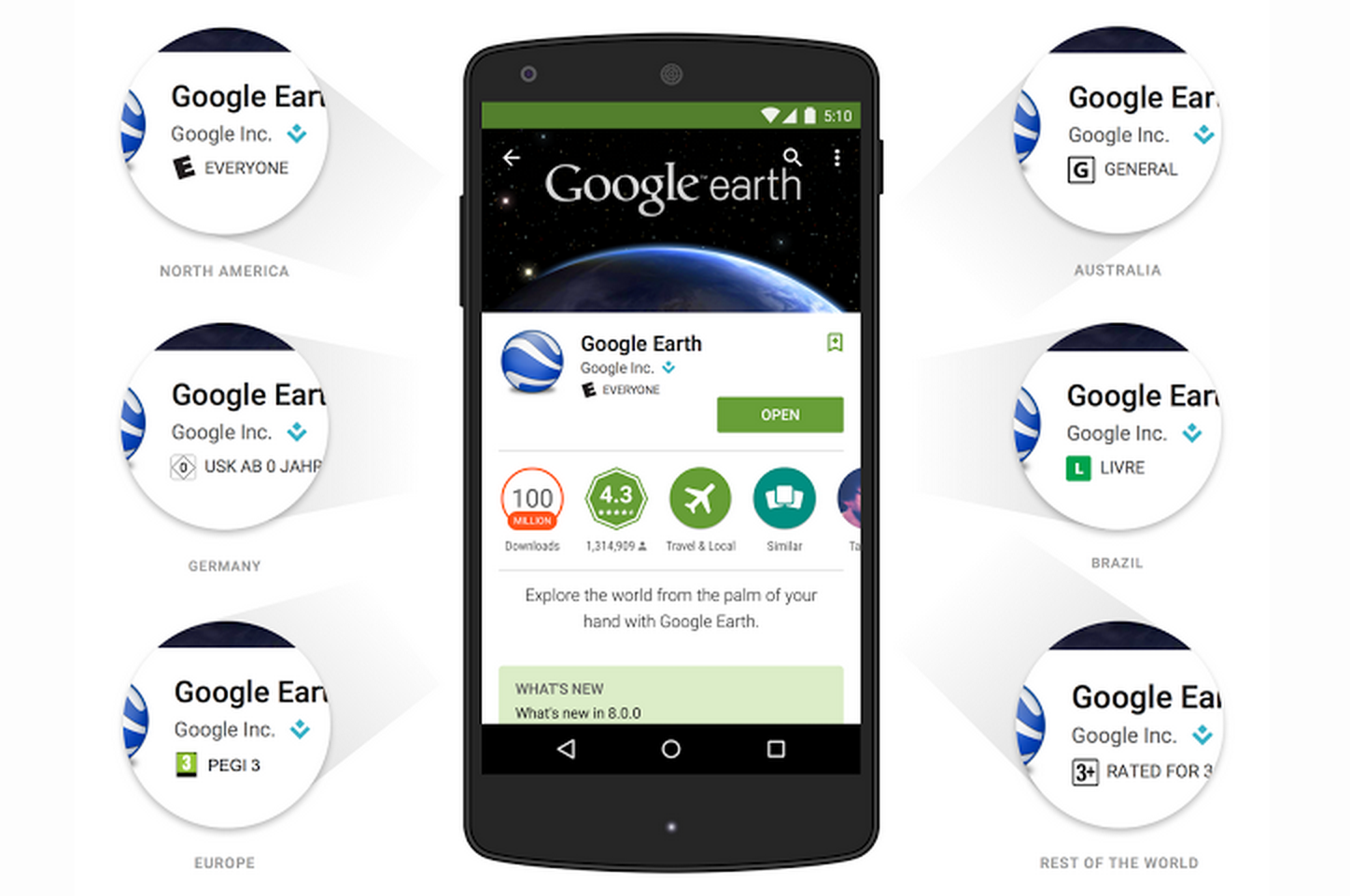
Google is rolling out two new features for Google Play today that it says will improve the experience for both users and developers. First, the company is introducing a new age-based rating system that Google noted includes considerations for the fact “different countries have different ideas about what content is appropriate for kids, teens and adults.” It’s using industry standard rating systems and requiring devs to submit information about their apps by May:
Expand
Expanding
Close
Motorola has today pushed out an update to its Motorola Gallery app, bringing a host of improvements across the board. On all devices, the app features an improved Camera Roll view with better sorting, a new app icon and Material Design enhancements, and quicker access to photo cropping. Also, you’ll find that the the app’s “Highlight Reel” is now available for both variants of the Moto X and the Droid Ultra.
As per the app’s description on Google Play:
For all devices:Improved Camera Roll view with sorting by event and timeNew app icon and material design enhancementsQuicker access for cropping a photoStability and performance enhancementsFor Moto X (1st Gen.), Moto X (2nd Gen.), DROID Ultra family and DROID Turbo only:Highlight Reel now available for Moto X (1st gen), Moto X (2nd gen) and Droid UltraMore free music downloads to personalize Highlight Reels
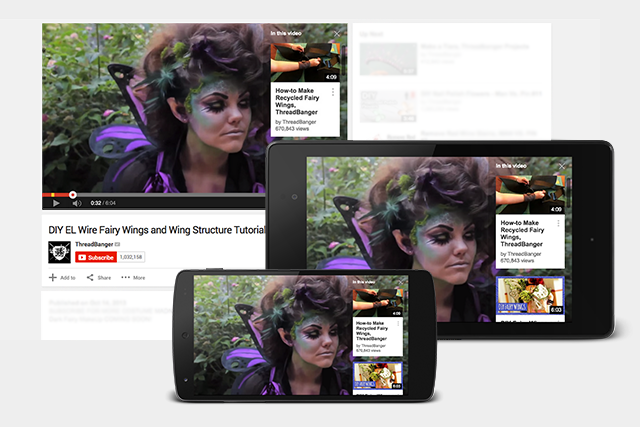
YouTube is today rolling out a new Cards feature today that allows creators to add interactive, Google Now-like pop ups on videos. YouTube first showed off the feature in preview mode back in June but is today opening it to all on both mobile and desktop.
Expand
Expanding
Close
[youtube=https://www.youtube.com/watch?v=t4vkQAByALc]
Google just announced its much anticipated Google Calendar app for iPhone is now available on the App Store. The app is essentially an iPhone version of the standalone Calendar mobile app previously only available for Android devices. Google first unveiled the latest version of its Calendar app alongside the release of Android 5.0 Lollipop late last year.
The Google Calendar app for iPhone works with your Exchange and iCloud calendars and also integrates with Gmail to automatically turn events from emails into Calendar entries. Here’s a rundown on features from Google:
Google is rolling out updates to its Google Docs, Sheets, and Slides apps for the iPhone and iPad today bringing the ability to make a copy of a document and more.
In addition to the new “Make a copy” function for documents, spreadsheets, and presentations across all three apps, you’ll also now be able to copy links to your device’s clipboard. Sheets and Slides also receive a new “accessibility settings menu when VoiceOver is enabled.”
The updated apps also arrive with bug fixes and a few other minor enhancements.
The latest version of Google Docs, Sheets, and Slides will be hitting the App Store today.
* Make a copy of a document
* Bug fixes and performance improvements
Google this morning has released a major update for Gmail on iOS. The update bumps the app to version 4.0 and packs a handful of new features. First off, Gmail on iOS now supports the ability to archive and reply to messages directly from a notification, a feature many have been requesting since iOS 8 launched.
Google announced a couple of weeks ago that it had acquired some technology and IP from Softcard, and today the company has taken to its website to announce that the service will be getting shuttered completely as of March 31st.
This news comes after rumors started spreading that Google would be re-introducing its payments service at Google I/O under the name “Android Pay“. Google’s Chrome and Android lead Sundar Pichai confirmed the existence of such a service earlier this week at Mobile World Congress.
The update, seen on Softcard’s website, reads:
Important News! We are pleased to let you know that Google has acquired technology from Softcard to power the next generation of mobile wallets.
What does this mean for you? As of 3/31 your Softcard app will no longer work. You can continue to use the Softcard app until 3/31. After that your Account will be closed.
To keep using a digital wallet app download Google Wallet now.
For more information read our FAQs.
For those that still use Softcard, the company recommends that you head over to Google’s website to download Google Wallet.