Apps and Updates




Google today announced some updates for its Google Cardboard virtual reality experience that it says is now in the hands of around 500k people since launching in June (not including unofficial versions). The main updates include new SDKs for developers building experiences on Android and Unity and a dedicated section for virtual reality Cardboard apps in the Google Play store.
Expand
Expanding
Close
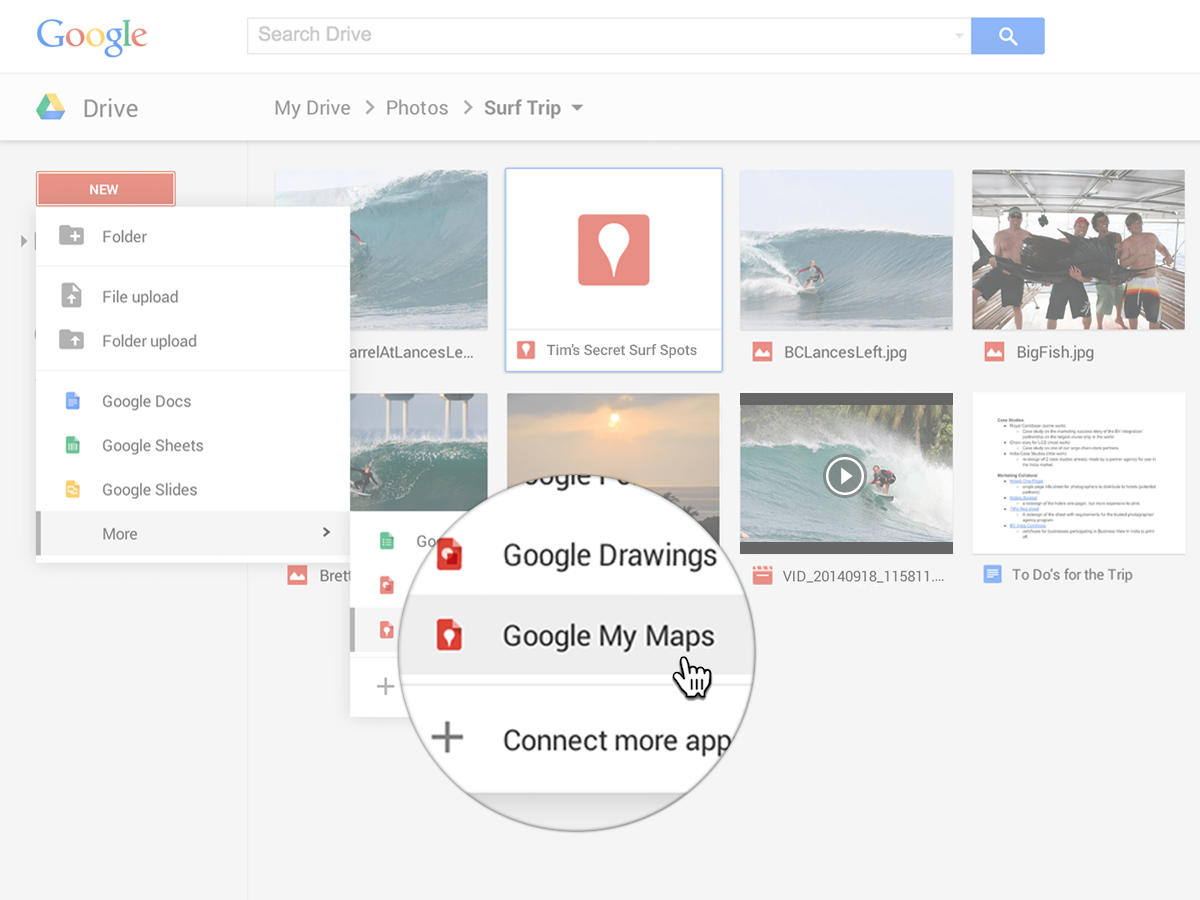
Google announced today that it’s making its custom map creation tool called Google My Maps available to users inside of Google Drive. That means that that custom map tool will appear as a Drive app alongside the usual Google Doc, Sheet, Slides, Drawings, etc (as pictured above).
Expand
Expanding
Close

Instagram announced today that it’s now at 300 million monthly active users, up from 200 million users that it announced approximately nine months ago. The company is announcing the new milestone on its website alongside other update user stats.
In addition, Instagram is today rolling out verified badges for brands and public figures while announcing it’s making a “significant effort to remove spammy and fake accounts”:
Expand
Expanding
Close

https://www.youtube.com/watch?v=k9P3xf85R1w
After brief availability as a beta version, Nokia has now released the full version of HERE Maps for Android on the Play Store. The mapping app enables you to search, navigate or get directions around the world, with the ability to download interactive maps to your smartphone or tablet for offline navigation.
Expand
Expanding
Close
Shazam for Android received a major update on Wednesday with a redesigned home screen and music player for more conveniently keeping up to date with the latest artists you have identified, finding out what songs friends are listening to and accessing the latest Shazam charts. A brand new Shazam.com was also launched with a Hall of Fame for artists and other new features.
Expand
Expanding
Close

You’ve long been able to share your location with contacts in Hangouts chats, but the Google Hangouts for Android app is today getting a little smarter, noting when someone has asked where you are and automatically prompting you to share your location on a map.
Google indicates that this is merely the first step in building more intelligence into the app, describing it as “the start of something new.” Future versions of the app are thus likely to recognize more questions, offering the ability to answer them with a single tap.
The latest update to the app – which is rolling out during the course of the day – also offers a number of other new features …
Expand
Expanding
Close

Update 1/15/15: The non-Beta version of the app was updated today with the same features that came to the beta version last month.
Wikipedia is definitely one the more used Android apps, and today the app’s beta channel has been updated with a plethora of new features. Most notable of them is the fact that today’s release packs a Material design revamp (including a new drawer and overflow menu), and support for Android 5.0 Lollipop. Other features, like the return of the search bar and other layout improvements, are just a couple of the more than a dozen changes made in this version.
The new version also features improvements to search order, Wikidata descriptions under page’s titles in search, and swipe to refresh on pages and on the “Nearby” tab. You’ll also notice, at the bottom of an article you’re reading, that this new version adds a new section called “Read more” where you’ll find various related articles. Finally, rounding out the more obvious changes, there’s now an option in the “More” section for disabling image loading (helpful if you are strapped for data).
As noted on the app’s Play Store listing, here’s the complete list of changes:
– Material design icons and 5.0 support– Search bar is back– Search order improvements– Wikidata descriptions in search results, similar pages, under pages titles– Swipe to refresh on pages and for Nearby– Collapsed infoboxes– Better tablets layouts– Read more section– Allow disabling images– Basic syntax highlighting of templates while editing– Hide IPA– ToC drawer always on– Similar pages, page issues, reference info display changes– Display MathML images– Remove pinch-zoom
Google has today announced that a new feature called reactive prefetch has been rolled out to mobile search, making searches somewhere in the realm of 100 to 150 milliseconds faster—a notable improvement if you’re on a fast enough internet connection. Sadly, the feature is limited to those using the Chrome app for Android at the current time because, according to Ilya Grigorik, “it is the only browser that supports (a) dynamically inserted prefetch hints, and (b) reliably allows prefetch requests to persist across navigations.”
This is a powerful pattern and one that you can use to accelerate your site as well. The key insight is that we are not speculatively prefetching resources and do not incur unnecessary downloads. Instead, we wait for the user to click the link and tell us exactly where they are headed, and once we know that, we tell the browser which other resources it should fetch in parallel – aka, reactive prefetch!
How does the feature work? Unlike other prefetch methods, reactive prefetch will wait for the user to click a link so that Google knows exactly where they intend to go, at which point the search engine will tell the browser to fetch certain parts of the page in parallel—namely, resources that Google has determined are likely to slow page load times. This is possible due to Google search crawlers getting an idea, for every page on the web, what parts should be “hinted” at to prefetch reactively.
You may or may not notice the improvement, but it’s rolling out to mobile search for Chrome on Android today.

Amazon this evening has released a relatively major update to its Kindle app on Android. The update bumps the app to version 4.8 and packs a handful of notable new features, some of which have been available on the iOS side of things for over two years now.
VLC (Video LAN Client) has long been one of the choice media players for Android users, but—while every release has been basically stable—the company hasn’t been in any rush to push the app out of beta and on to version 1.0. Today, that finally happened, and the update packs a bunch of other goodies including fixes for ARM V8 processors and Android 5.0 Lollipop.
According to the app’s Play Store listing, version 1.0 includes the following:
This release fixes ARMv8 processors, Android 5.0 crashes and minor improvements. The 0.9.x series is major release with hardware decoding and a new interface available in dark or white colors. It integrates DVD iso and menu support, an equalizer, playlist management, Widi screens support and updated SD cards detection. Hardware acceleration is now enabled by default on 4.3+ and has better subtitles support. Software decoding has been accelerated too.
Yahoo announced today that it will be hosting its first ever developer conference, The Yahoo Mobile Developer Conference, early next year in February. Yahoo confirmed it plans to use the event to unveil a new suite of developer tools for mobile apps that will “help developers better understand their users and improve, grow and monetize their apps.”
Expand
Expanding
Close


YouTube for Android has finally been updated with a Material Design interface for devices running Lollipop. The entire app has been redesigned, from the “What to Watch” screen to individual channel and video pages.
Aside from the new design, the updated app also includes many new filter options for searches, allowing users to find videos that meet specific criteria. For example, you can now search only for videos that are available in HD, or have closed captioning enabled. You can also search for live streams.
A couple of months ago, Microsoft released a Bing-powered voice assistant app called Torque, and now the same app—which was previously only for Android Wear devices—can be activated at any time on your Android phone itself. The app works very similarly to Google’s own “OK Google” offering, but with a twist. Literally, you twist your wrist to activate the assistant rather than using your voice. But beyond that activation gesture, the app offers much the same information as OK Google, like weather updates, sports scores, information about nearby restaurants, stock prices, and more.
A day after rolling out updates to nearly every app it makes, Google this afternoon has announced an update to the Play Store itself. In a post on Google+, Google employee Krill Grouchnikov announced the update, saying that it’s coming soon to Android devices everywhere. The update makes several user interface tweaks for both pre-Lollipop devices and ones on Lollipop. It bumps the app to version 5.1.
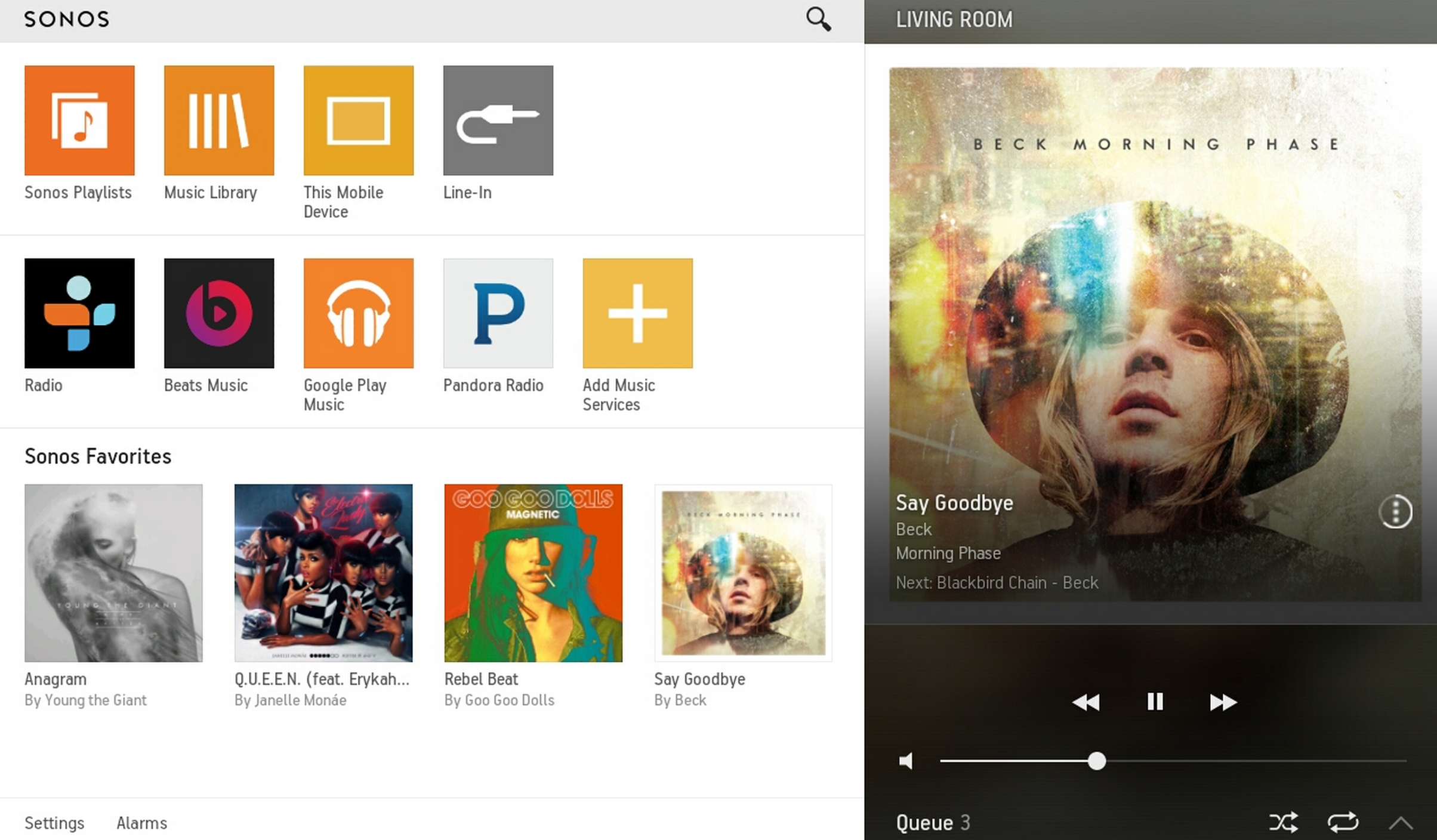
Sonos is today rolling out software update 5.2, previously in beta, and with it includes an updated Sonos Controller app for Android that brings multi-account support and other new features.
Expand
Expanding
Close
AirDroid is a well known Android app that has long allowed you to remote-control your Android phone from a Windows or Mac OS X machine. But with the countless updates that Apple brought to iOS this year and the continuity features that tie the iPhone and Mac OS together seamlessly, Android users were left with much to desire. The latest version of AirDroid makes an attempt at filling that hole in Android users’ hearts with its latest release, bringing tons of features that make using your phone from a desktop environment easier than ever.
Spotify Premium gives you no ads, offline listening, on-demand listening even on mobile and better sound quality, and normally costs $9.99. So to get three months for just $0.99 sounds like a deal that’s too good to be true.
Unfortunately, it pretty much is. While the deal is there for new users, anyone who has ever subscribed to Premium or Unlimited isn’t eligible, and nor is anyone who has ever taken a one-month free trial of Premium. So, er, just about anyone who likes Spotify, then.
Still, if you do have friends who’ve never taken up the trial, this would be the perfect time for them to try it out. They will have to provide card details and remember to cancel before the three months is up, otherwise they will start paying the usual $9.99 a month.
For any budding DJs, the music mixing app djay came to Android a month or so ago, complete with Spotify integration.
Spotify also recently announced a family deal of $4.99 a month for each additional Premium user. The Spotify Music Android app is a free download from Google play.
Via 9to5Toys
Google’s Update Wednesday regiment is in full effect this afternoon as the company has rolled out updates to a handful of its Android apps. While many of the updates contain merely bug fixes, several are somewhat notable.
Google today released a new Android app called Device Assist that offers live tech support, troubleshooting, tips and more for Nexus, Google Play edition, and Android One devices.
Expand
Expanding
Close
The Bluetooth Special Interest Group (SIG) has announced an updated Bluetooth spec, version 4.2, that introduces a number of new features alongside enhancements to speed and privacy. The update also allows for Bluetooth over IPv6, which along with an upcoming update will allow devices to have a direct connection to the Internet and open up new possibilities for Bluetooth sensors and other accessories.
Expand
Expanding
Close
In a post on the official Drive Google+ account, Google today announced that Gmail web users can now easily open and edit Microsoft Office attachments. Google previously introduced the ability to edit Office files in Drive, but today’s update makes the process considerably easier for Gmail users. Now when a user receives a Microsoft Office file in an attachment, they can simply click the “edit with Google Docs” pencil icon to instantly open and edit the file.
Pandora is rolling out an updated version of its Android smartphone app with a strong emphasis on personalization.
Personalized genre and artist suggestions will now appear at the top of your list of stations, and a new thumbs-up icon on the now-playing screen gives you fast access to song ratings – as well as acting as a visual reminder that you only get the most from the service if you get into the habit of rating songs.
There’s also a modest visual redesign. The update will roll out to phones in the coming weeks (it’s not yet available from Google play), with a tablet refresh to follow at a later date.
Pandora made it to Google Glass back in August, allowing voice control of stations and touchpad control of play/pause, favoriting and dismissing a track.

SwiftKey announced on Tuesday that it has collaborated with Intel on an ambitious project for the past two years: improving the communication system of Stephen Hawking. The custom keyboard maker makes it easier for the well-known scientist, who has motor neurone disease, to predict full words, based on a small sensor activated by a muscle in his cheek.
Expand
Expanding
Close
Firefox for Android received a major update this evening, bumping the app to version 34 and adding a handful of new features. Firstly, the update adds mirroring support for the Chromecast. This means that users can now mirror their browser to Google’s streaming stick. This feature was previously available in the beta build of Firebox for Android, but was incredibly buggy. Early reports say that the feature works as expected with today’s stable channel update, however.