Google Account


To take full advantage of Google services, Web & App Activity and Location History often have to be enabled on an account and device. At the same time, the company has been working to give end users more control over their privacy, and today is introducing an auto-delete feature.
The best way to protect online accounts is with a security key that ensures you’re the one signing in. However, enterprise users still have legacy systems like Internet Explorer or remote desktops that don’t support the new log-in method. Google now has security codes created using security keys for those scenarios.
Google today alerted G Suite admins about two incidents where users’ passwords were improperly stored. This security issue only impacts paid Google accounts and free consumers are not affected.
Given how much of people’s lives are now online, security is of paramount importance. New research from Google this week shows how even adding a recovery phone number to your Account can do a great deal to prevent hijackings.
At I/O 2019, Google announced that moving forward its smart home products would be branded under “Nest.” The Home Hub became the Nest Hub, while the first product from this initiative is the Nest Hub Max. Meanwhile, Google confirmed that Home speakers will get Nest branding in the future, while Nest Accounts will be migrated to Google Accounts to address recent security issues.
For the past several months, Nest has been plagued with stories about its cameras getting “hacked.” The underlying issue is bad password management and reuse, with Google encouraging 2FA and actively reseting compromised passwords. A new report today reveals that Nest accounts could eventually use Google log-ins.
Last week at Cloud Next 2019, Google announced that all Android 7.0+ devices can serve as security keys. However, the reality is that most people do not use 2FA, and other methods are susceptible to man-in-the-middle attacks. Google is now working to counter MITM attacks by blocking sign-ins from embedded browser frameworks.


It’s not easy to keep our online lives secure, but Google is working to take some of the hassles out of it. Recently, the company announced that it would let users turn any Android Nougat smartphone into a security key for their Google account. Here’s how to do just that.

Safer Internet Day is officially today, but Google is spending the entire week discussing security and launching new features. The first is a Password Checkup Chrome extension that will advise users to reset credentials breached on third-party sites, while Cross Account Protection extends first-party tools to re-secure breached Google Sign In apps.
One of the first places that the Google Material Theme widely rolled out to was the Google Account settings on Android. A similar revamp is now available on the web, with the new design sharing many similarities to mobile, but better optimized to take advantage of the bigger screen real estate.
October is Cybersecurity Awareness Month and Google is announcing a slew of new features related to the sign-in process and account usage. New Google Account security protections include requiring JavaScript to be enabled when logging in and removing harmful apps during Security Checkup with Play Protect.
Google last month announced a new sign-in page for logging into your Google Account that takes advantage of several new Material Theme stylings. “Unforeseen delays” delayed that launch, but it is finally rolling out this week with one tweak.
Online privacy has been a big focus for many tech companies this year, and Google is no exception. We’ve been tracking a redesign of the “Google Account” page for a while now, and today, Google is officially announcing that change.
Prior to I/O 2018, we enabled a redesigned look for Google Account settings on Android. Today, this Google Material Theme revamp for Google Account settings is widely rolling out. In addition to offering a new visual design, it is better at presenting key information.
To allay privacy concerns about its ad-centric business model, Google since 2009 has maintained a centralized dashboard to control ads, with later tools allowing for muting and seeing why a specific ad was displayed. The latest change today redesigns Ad Settings with a focus on making it easier for users to understand and control.

Since I/O 2018, apps like Google Drive have joined Gmail, Google News, and more in adopting Google’s new Material Theme. The latest service to join is the Account sign-in screen, with an update coming later this month.
Even before I/O 2018, Google’s latest iteration of Material Design began rolling out to various apps like Gmail and Google Tasks. Following the unveiling of Material Theming, more apps adopted it with many more updates expected. Today, the latest service to feature it is the Google sign-in page.
Google Assistant speakers — and upcoming smart displays — have wide access to your personal information from calendar appointments to shopping lists and can even make payments. Given this increased functionality, Google is now listing Home in the device section of My Account settings.
In light of high-profile hacks of political figures, especially during the 2016 US Presidential election, Google is working on new security tools. Aimed as a service for politicians and executives, it will replace two-factor authentication (2FA) and enforce other security policies.
With the Google Dashboard, users can see data and information about the various Google services they use. Featuring useful stats, it also provides quick shortcuts to individual product settings. The interface is being redesigned today with a more mobile and touch-friendly design.

A year ago Google simplified security and privacy settings with a redesigned My Account page. On its one year anniversary, Google has announced that over a billion people have used the site and that several new features, like how to find a lost phone including Android and iOS, are being added.
As part of Safer Internet Day 2016, users who perform a security check on their Google account will get 2GB of additional free Drive storage. Those who did the promotion a year ago can even do it again and get the added storage.
Google is a very security conscious company and always working on ways to keep users safe. They are currently testing a new way to sign into your Google account without needing to enter a password. One user on Reddit was invited to test the new method and posted detailed screenshots of the process.

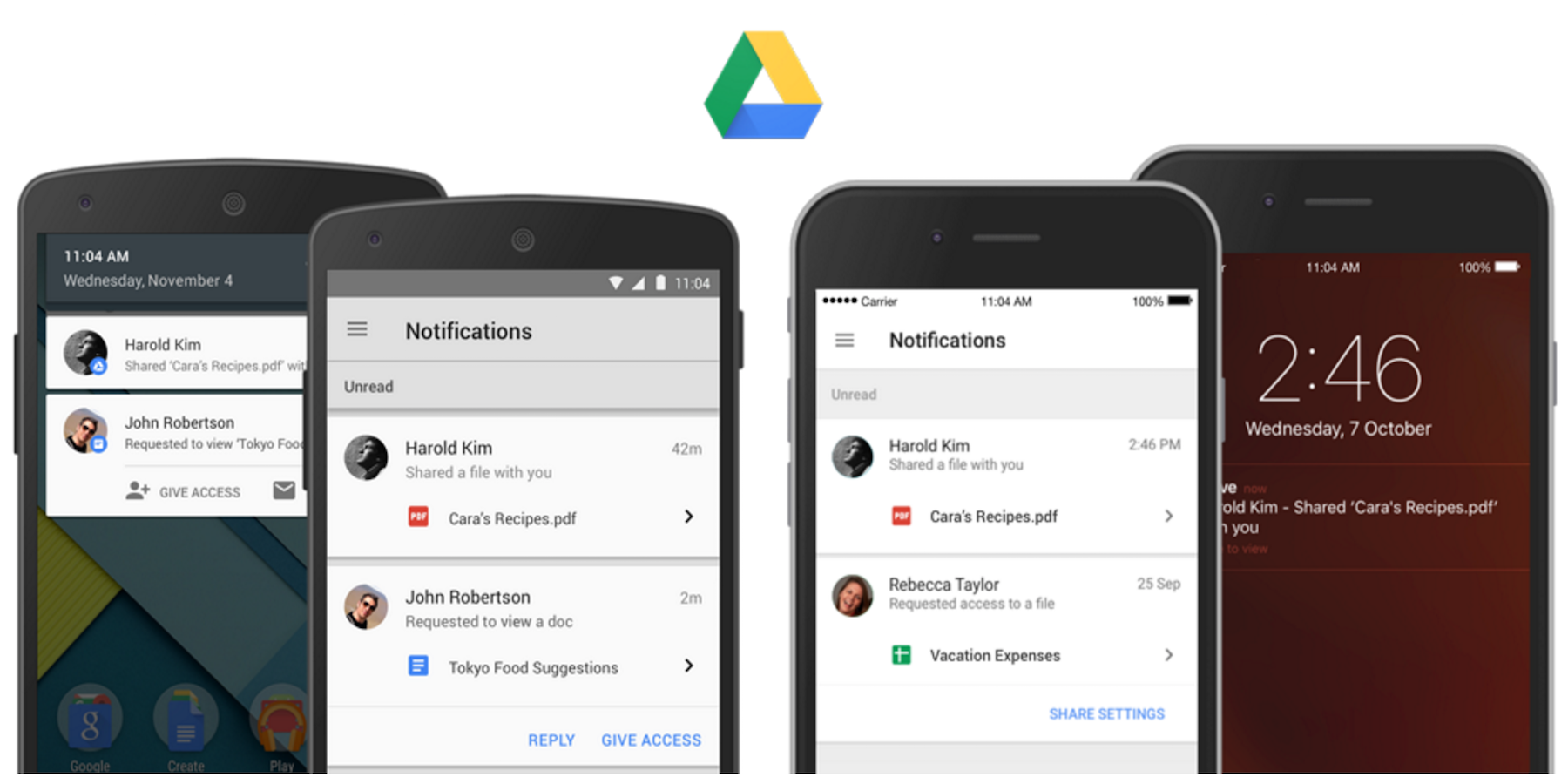 Google Drive updates arriving today include new features for the Android app including sharing notifications and the ability to share with people without a Google account.
As part of its Drive mobile app updates today, both users of the iOS and Android apps can now enable notifications for when files are shared with them. Not only is it a notification, but it also acts as a quick links to jump right into the file or folder. And in addition, Google notes that “If a file/folder owner has notifications turned on and someone requests access to their content, the owner will be notified of the request instantly on their mobile device so they can quickly grant access.”
And while the Google Drive iOS app is getting what Google describes as a new consistent sharing experience (essentially bringing it up to par with Android), Android users are getting the ability to share with people without a Google account:
Until now, a Google Account was needed to view shared files on an Android device. Now, people can do this without a Google Account just like they can on the web.
The updated Google Drive app for Android is available now.