Stay up to date on news from Google headquarters. Be the first to learn about plans for Android, Google Plus, Google Apps, and more!
Stay up to date on news from Google headquarters. Be the first to learn about plans for Android, Google Plus, Google Apps, and more!


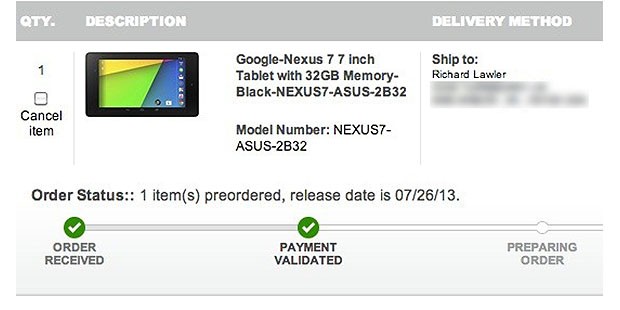
We’ve been hearing reports of the new Nexus 7 showing up as on sale in stores before the official launch date of 30th July, and this now appears to be happening at Best Buy, Walmart and Amazon.
The first confirmation we saw came from Engadget in the form of a Best Buy pre-order update showing a release date of today.
We put our money down for one when the order page first went up, and while the confirmation originally said it would arrive on the original July 30th launch date, it’s now telling us that we can expect our tablet later today. That jibes with info we were given by a source claiming to be the manager of a Best Buy store. He said that while pre-orders started yesterday, “there were few (of them) in my region,” meaning that “if you are present at a (Best Buy) location today at opening, you have a good chance of buying the tablet.”
Tweets are now showing the same thing happening at Walmart and Amazon:
Other retailers are reportedly sticking to the scheduled launch date, so it’s unclear why this is happening, but if you want to get your hands on one a few days early, it appears that you can.


As expected, Google finally took the wraps off its new Nexus 7 tablet yesterday during its breakfast with Chrome and Android chief Sundar Pichai. While there was no mention of a possible update to its 10-inch Nexus, it appears Pichai has since confirmed in an interview with The Wall Street Journal’s Amir Efrati that a new version of the device would be arriving in the “near future”:
Expect to see new 10-inch Nexus 10 Android tablet (made by @Samsung) in the near future, Google's @sundarpichai tells me
— Amir Efrati (@amir) July 24, 2013
While we haven’t been hearing much about a new Nexus 10, which was first introduced back in October, we did recently hear that Samsung was working on an octa-core Nexus 11 alongside a new 11-inch Galaxy Tab for later this year. Pichai apparently confirmed that next-gen Nexus 10 would again be made by Samsung, and “near future” seems to indicate we’ll likely see the device shipping with the latest version of Android 4.3 sometime later this year.


According to a new report from TechCrunch, Google is in the midst of testing a new e-commerece service that would allow users to buy and sell services via video. The service is reportedly dubbed “Helpouts” and has been in testing within the company since June, with a public release not happening for at least another month.
The service would obviously be based heavily on Google’s Hangout video chats. The services could be started instantaneously or planned as classes. As an example, TechCrunch suggests that a Spanish tutor from Argentina could offer to train other users in the language for a fee, or that a Yoga instructor could provide classes to stay-at-home moms. Users would be able to create a Helpout profile and build a reputation over time.

Sometimes you want to know how much money you made on Google Adsense ads, but don’t have time to go look at your phone/tablet/computer. Fret not, Google Glass wearers. As SearchEngineLand points out, there is a Google Glass Adsense app that can be sideloaded onto Google Glass headgear to do just that. Developer Chad Smith announced the App, which is hosted at Github.
The Glass AdSense App will show you pageviews, clicks, click through rate and earnings for today, yesterday, last seven days, last thirty days, this month and last month. You can refresh the stats as often as you like and of course, you’d need to “pin” the card to your timeline so that you can access it.
Google just seemingly ‘cast’ its Google TV project to the curb. As a much simpler version of GoogleTV, the leaked Chromecast allows you to do what you can now do on Google TV: pushing content from both Netflix and Youtube to your TV. Unlike Airplay, the Chromecast stick allows the original device to turn off or go to sleep. It functions as a standalone streaming device, awaiting orders from an iOS device, Android device, or Chrome browser on a PC, Mac or Chromebook Pixel (strangely, other Chromebooks need not apply).
Google has also baked in iOS support, which will allow users of both platforms to control Netflix or Youtube. You can also broadcast a tab in the Chrome Browser.
Google Play music and movies can also ‘cast’ to the best speakers in your house as long as those are connected to your TV. Pandora is coming soon.
It will be available from Google Play, Amazon and Best Buy as well as other retailers. We’ll have a review up as soon as possible.
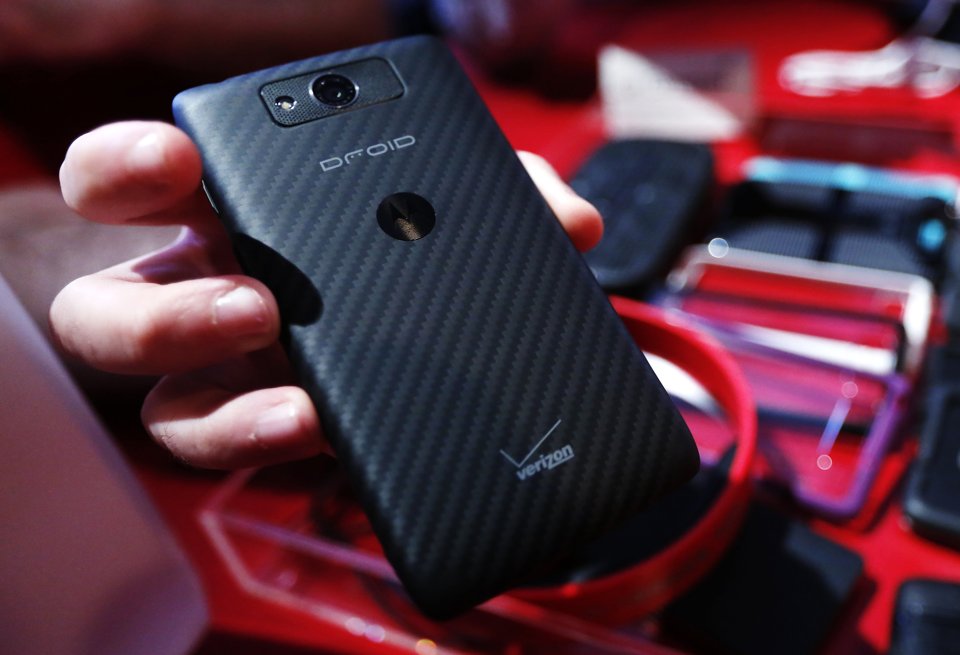
Photo: Yahoo News
While we already knew that the Droid MAXX, Droid Ultra and Droid Mini, like all Droids would be exclusive to Verizon (‘Droid’ is a Verizon brand licensed from LucasArts after all!). CNET now reports that the exclusivity will work in reverse too: with all Droid-branded devices being manufactured exclusively by Motorola.
Starting with the Droid Ultra lineup, Motorola will be the only smartphone manufacturer to build Droid smartphones, Verizon marketing executive Jeff Dietel told CNET on Tuesday.
Verizon had previously used the Droid brand for handsets from a range of manufacturers, including HTC’s Incredible series and Samsung’s Droid Charge. With HTC moving to its own ‘One’ branding and Samsung’s own, more powerful Galaxy branding, the news doesn’t come as much of a surprise.
These latest handsets are likely the last vestiges of pre-Google Motorola and with the Moto X coming in a few short days, these are likely some of, if not the last devices designed before the takeover by Google. Google-installed CEO Dennis Woodside noted earlier this year that Google was working to clear some mediocre inventory that had been been built by his predecessors. With due respect to Mr. Woodside, the 48-hour battery life and other specs on these are going to give the X phones a run for their money.
.
Sadly, there are no more secrets left to reveal here. We’d already seen the Best Buy circular and inventory system and we knew the specs which include Android 4.3 and $230-$270 price tag for 16GB and 32GB. But now you can, well, buy them. People should start getting them before the end of the month. Unless they come sooner.
Here’s Best buy’s spec list:
Enjoy your media on the go with this Google Nexus 7 tablet, which features a 7″ 10-finger capacitive touch screen with IPS technology that simplifies navigation and delivers vibrant images. Wi-Fi makes it easy to surf the Web.
Here’s the gallery from Best Buy:
It is showing up also at PC connection
Also, Droid-Life notes that it’s at Sam’s Club too.
Expand
Expanding
Close

You knew it was heading our way: Google Glass porn is now here and boy will Google be happy. For the details head over to Motherload.Vice.com.
[ooyala code=”90aWlpZDqumgU7y5TOUNjEPfcOUMXTqP” player_id=”null”]
NSFW NSFW NSFW Below the fold.
+Fabio Santos is ahead of the game when it comes to weekly circulars. According to the G+ user, Best Buy’s weekly circular features this week’s big hardware announcement from Google, the new Nexus 7 tablet. The specs (1920×1200 display) and price seem right in line with what we’re hearing, but available Tuesday before Google has a chance to announce it on Wednesday? That seems a bit premature. As pointed out by Android Central, this could be next week’s circular, putting the Best Buy release date at June 30th.
The X leaks keep coming in. Evleaks/Unlockr appear to have the first press shots (besides the ones on the invite and all of the ones Eric Schmidt showed off).
AndroidPolice also tweeted out a AnTuTu benchmark (below) which verifies our “Ghost” codename scoop earlier this year.
Expand
Expanding
Close
Rumors surrounding the Moto X Phone have been coming in at a crazy rate over the past few months, with information regarding design, customization, and more leaking. We’ve known for a while that the device is not meant to be high-end in terms of specs, and new information obtained by The Verge confirms that.
According to a “tipster who has used a CDMA variant of the phone,” it will feature a 1.7GHz Snapdragon MSM8960T processor, which is basically the same as a Snapdragon 600, but dual-core instead of quad-core. The device will also feature 2GB of RAM and a screen “in the vicinity” of 4.5-inches. Things get a tad questionable when it comes to the battery life, however, with The Verge’s source originally claiming that it had a measly 1500mAh battery, but later saying that figure might not be accurate, as it was reported by a software tool.
Expand
Expanding
Close

It’s pretty difficult these days not to have a Google+ account. Sign up for almost any Google service, and you find you’re on Google+ whether you wanted to be or not. But this aggressive approach of pushing accounts on people doesn’t appear to be paying off: a new report by Gigya cited by Marketing Land shows that only two percent of social media sharing takes place on Google+ …
Expand
Expanding
Close
The NSA’s $2b data centre in Bluffdale, Utah (source: businessweek.com)
After having their reputation damaged by the National Security Agency controversy earlier this year, Apple, Microsoft, Google, Facebook, and many more are joining forces to demand more transparency regarding NSA requests and surveillance (via AllThingsD).
The 63 companies, investors, and non-profit organizations are pleading with the U.S. government to allow Internet, phone, and other service providers to share the requests that they receive for user data, including:
The companies claim that the NSA request data should be published just like the law enforcement information has been for years.
“Basic information about how the government uses its various law enforcement–related investigative authorities has been published for years without any apparent disruption to criminal investigations,” a copy of the letter reads. “We seek permission for the same information to be made available regarding the government’s national security–related authorities.
Google’s Bay View campus render
Mercury News reports that Google is planning to soon make a return to Palo Alto, which is where the search engine company opened its first office in 1999. The now Mountain View based company has purchased a section of land on the 1000 block of East Meadow Circle, as well as an area of land on Fabian Way. Together, this comes out to nearly 15 acres of land.
Palo Alto’s Planning and Community Environment Department already has plans for what it wants Google to do in the area. Aaron Aknin, director of the department, says that area in which Google purchased the land calls for research and development and office uses.
Google, however, would not reveal what it plans to do with the land, but either way, city officials appear to be happy to have Google back in the area.
“We’re delighted to have Google come back to Palo Alto and we look forward to working with them on whatever their project ends up being,” said Thomas Fehrenbach, the city’s economic development manager.
Palo Alto mayor Greg Scharff, however, said that he believes the city should be focused on bringing start-ups into the area….
Expand
Expanding
Close
In what has been a crazy day for Nexus 7 successor leaks, Android Central has just posted a gallery of images of what it believes is the next Nexus tablet. The report claims that the device will again be manufactured by ASUS and come in 16GB and 32GB models.
The tablet features two cameras, a 1.2MP shooter on the front and a 5MP rear facer, made by Chicony.
As far as specs go, the Nexus 7 v2 is listed as having a Qualcomm APQ8064 motherboard with a Snapdragon S4 pro processor. The device is also said to have a whopping 4GB of DDR3L RAM, though Android Central notes that these specs may not be final. The tablet will also supposedly feature stereo speakers. These specs are exactly the same as what KGI analyst Mingchi Kuo predicted way back in May of this year.
Design wise, the device features a look similar to the original model. The volume rocker and power button are on the left hand side, while the microUSB port is on the bottom. It appears to be relatively thick for a 7-inch tablet and is made out of what looks like a rubber material….
Expand
Expanding
Close
Google has just sent out invites for an event next Wednesday, July 24th. The invite says that it is a “breakfast with Sundar Pichai,” which means that the focus of the event will probably be on Android and/or Chrome, which are the two departments that Pichai oversees. For those that can’t make the breakfast or were not invited, it will be live streamed on YouTube as well.
More than likely the event has something to do with Android 4.3 Jelly Bean, which is expected to be a very minor update over 4.2. It’s also possible that it’s the Nexus 7 successor, for which we just saw leaked pricing. We’ll be sure to let you know what Google has to say next week.
Android Central has obtained an inventory screen from an unknown retailer that lists pricing of the highly anticipated Nexus 7 successor. According to the image, the 16GB model of the device will come in at $229, while the 32GB variant will cost $269. For a frame of reference, the current 16GB Nexus 7 is priced at just $200 and the 32GB is $249.
Interesting G+ Post from Amanda Rosenberg on the genesis of the “OK Glass” hot word which activates the Glass headset:
In the car on the way back, Mat told me about how the team had been working on the “hotword” for Glass. I must confess, I did not know what “hotword” meant. Did I ask what it meant? No. Did I nod whilst looking pensive? You bet your glass I did. As I listened to Mat, I quickly* * * * deduced that he was referring to the phrase that sets off the Glass menu. He then asked me if I had any ideas for the hotword. In that moment the only phrase I could think of was ‘OK Glass’. I didn’t tell him straightaway though. Instead, I continued to look pensive and muttered something about ‘looking into it’ just to appear as though I was going to put more than 3 seconds of work into it.
Interestingly, it appears that OK has migrated to “OK Google Now” in Motorola’s upcoming X Phones.
Expand
Expanding
Close
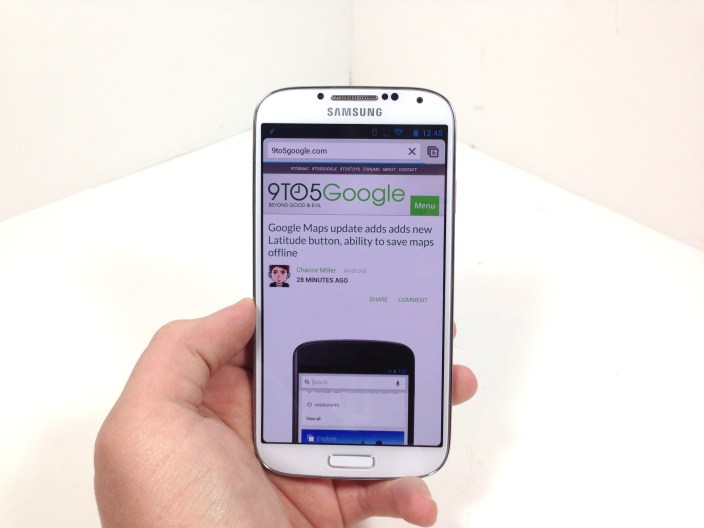
Way back at Google I/O 2013, it was announced that Samsung would be partnering with Google to release a Galaxy S4 variant running stock Android. Nearly two months later, the device is finally available to the masses and I’ve been using one as my daily driver for about a week now.
When the Google Play Edition Galaxy S4 was originally announced, I was really intrigued by the idea. Google has been releasing Nexus devices for the past few years, but I’ve never really fallen in love with one. They’ve all been good, but not great hardware. Nexus devices generally don’t feature top-of-the-line specs and are meant, in Google’s eyes, purely for developers to test apps their apps on.
Seeing how I had loved the original Galaxy S4, but couldn’t stand the bloated TouchWiz overlay, the Google Play Edition Galaxy S4 seemed like the perfect device for me. Near-stock Android paired with high-end, future-proof ‘resistant’ specifications. A match made in heaven, so to speak.
Expand
Expanding
Close


Google has just published a short update on Google+ notifying the public of a name change for its infamous wearable technology. Formally referred to as ‘Project Glass,’ Google will now official begin calling the product ‘Google Glass,’ at least through Google+ and its other online marketing. The 105-word post notes that the product has grown substantially since the start of its Explorer program and most people already refer to the wearable product as Google Glass, making the ‘Project’ prefix no longer necessary. You can learn more about Google Glass here.

Photo: salon.com
The sometimes stormy relationship between Google and Apple appears to be growing friendlier, with Google Executive Chairman Eric Schmidt telling Reuters at the annual Allen & Co conference in Sun Valley that the two companies were having “lots and lots” of meetings.
Schmidt did not provide details about the nature of the meetings during comments to reporters at the annual Allen and Co media conference in Sun Valley, Idaho on Thursday. He noted that Google Chief Business Officer Nikesh Arora, who joined him at the press briefing, was leading many of the discussions.
The two companies are in “constant business discussions on a long list of issues,” Schmidt said.
The two companies started out close. Schmidt joined Apple’s board in 2006, and the iPhone launched with both Google Maps and YouTube on board. That was to change after Google’s Android platform began growing in popularity, with Steve Jobs threatening “thermonuclear war” on Google over what he felt was a copycat product …
Expand
Expanding
Close
http://www.youtube.com/watch?feature=player_embedded&v=sr1Qz63AzK8
Google announced on its Google Commerce blog today that it’s expanding the places you’ll be able to receive and save Google Offers. Previously, Google provided the deal service through its Google Offers website and the Offers and Google Wallet mobile apps, but it’s now also including Offers as ads in search results and on websites, as well as through the just released Google Maps for Android app.
If you find an offer you want, like a free appetizer at your favorite restaurant, you can easily save it to your Google account. The next time you’re at the restaurant, just show the offer on your phone screen to redeem. No need to hassle with clipping paper coupons, purchasing vouchers in advance, or forgetting your coupons at home.
Google will be making Offers available through search results and on websites through ads with a big “Get Offer” button that will allow users to save the Offer to their Google account and redeem later through the Google Offers mobile apps for iOS and Android. Offers will appear in the new Android app when searching for a restaurant or retail store:
Google has already partnered with Michaels Stores, RadioShack, Red Mango, Red Robin, and Ulta Beauty for Offers, but plans to roll out Toys”R”Us, Sports Authority, BJ’s Restaurant, Macy’s, Disney Store, and Payless Shoesource in the near future.
An image showing what the new Google Offer ads will look like is below:
Expand
Expanding
Close

As previewed at Google I/O 2013 in May, Google has just begun rolling out the latest version of Google Maps for Android to Android 4.0.3+ users. The update, which is available now for download at Google Play, will provide users with a new design (both on tablets and smartphones), live traffic updates, improved navigation, incident reports, and a new Explore function. This Explore feature is a “new way to browse and discover popular local places to eat, drink, shop, play and sleep,” per Google’s release notes. While the update is out today, the new features will arrive gradually for end-users. Phandroid provides a link for side loading on the complete update today.
When Google rolled out its new unified Hangouts messaging service, some users were disappointed that the new experience within Gmail removed the ability to place free calls within the US and Canada. Google previously confirmed that the feature would be returning and today it announced on its Gmail blog that it is rolling out the free calling feature to Gmail Hangouts and also adding some new features.
In addition to improvements to desktop calling, such as the ability to “add multiple phone numbers and video participants to the same call” and play sound effects, it is also making calls to the US and Canada free from any country with access to Hangouts.
Expand
Expanding
Close
