Apps and Updates



While Chrome 48 began rolling out on browsers last week, Google has announced some new features for it across the various platformsm it is on. Most notably, Chrome for iOS gets significantly faster, the Data Saver extension exits beta, and extensions are now better highlighted.
Last week, Chrome 48 for Mac, Windows, and Linux brought few user facing updates. Now, version 48 of Chrome OS was just released and brings improved download notifications, a Material Design Video Player, and other updates, in addition to security fixes.
When Google Now has a relevant piece of information to share, it sends users a notification. In the past, the notification icon that appeared in the top bar was specific to the type of info. A small update to the Google app today changes the icon to a more generic ‘G‘.
According to a rumor last year, Google would remove the ability to send SMS from Hangouts in a future update. While version 7.0 released today is not that update, it advises users to switch to Google Messenger for SMS. It also adds quick reply to notifications and the ability to add message shortcuts to the homescreen.
If Gmail was Google’s answer to email in 2004, Inbox is how the company wants everyone to do email in the future. Like Google Now, it has intelligent features that make it easier for regular users to manage their email. An update today makes search smarter so that users don’t have to dig around their messages to find something.


According to a report this morning from The Wall Street Journal, Spotify is getting ready to finally launch its video content offerings. The rollout is set to start with the Android app getting video by the end of this week, but the iOS app is following suit by the end of next…
Expand
Expanding
Close
On Friday, we wrote about new audio and video calling feature possibly coming to Snapchat. Since then, the developer who discovered the code references in the Snapchat APK has gotten these features to work and posted screenshots. They reveal that Snapchat is working on a completely revamped version of chat, dubbed ‘ChatV2’.
Two developers looking around in the Snapchat for Android APK have found references to video and audio calls possibly coming to the ephemeral social network at some point in the future. Additionally, there might also be an audio notes and a Periscope-like livestreaming feature coming…
Earlier this week, Gmail for Android version 5.10 shipped with a fix for a sync issue involving Hotmail accounts. However, Google is still working on a bug that prevents Nexus devices in particular from getting notified about incoming Gmail messages.

SwiftKey has updated the beta version of its popular keyboard app to include in-depth, personalized and visualized stats for all its users. Using SwiftKey Stats in the SwiftKey beta app for Android you can now see more than just the usual set of statistics. It looks at your typing habits, and brings you a pretty fun look at your most-used emoji, topics and more.
If you’re intrigued and want to try it for yourself, you can download the beta for free from the Play Store. Once installed, go through the set-up process and then sign in to your account. As soon as you start typing, the app starts collecting information and will be able to give you your stats.
Kickstarter, the crowd funding juggernaut, finally has an Android app three years after launching one on iOS. The mobile app replicates much of the website’s functionality, but doesn’t yet let project creators manage their campaigns on the go.
Chrome on Mac, Window, and Linux is being updated this week to version 48. The latest update contains the usual bug fixes and improvements for the desktop browser, but mobile devices will see the bulk of the improvements. Future updates to Chrome, we’ve learned, will bring a new compression algorithm that will help the browser load faster pages and use less power on all platforms.
Some users are reporting that links in Google+ for Android are opening as Chrome Custom Tabs. The feature introduced and released last year opens links twice as fast when compared to being pushed out to a browser. The update appears to be triggered server-side and was apart of last week’s update.
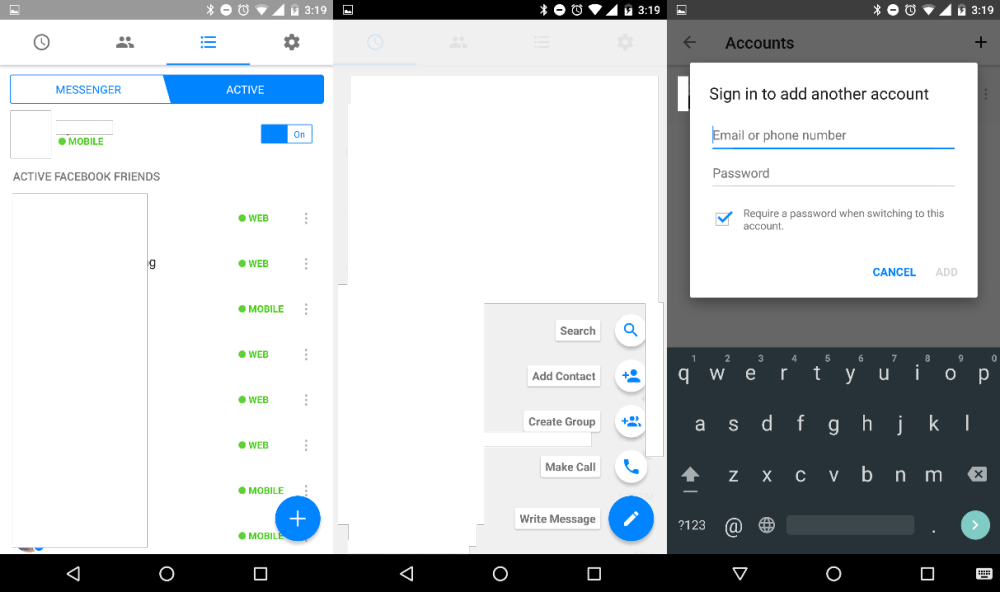
Facebook is testing a minor Material Design-inspired refresh for its messaging app, Messenger. The addition of the floating action button (FAB) is the biggest and most notable change, but there are some other minor design tweaks and a new feature that allows multiple user sign-ins.
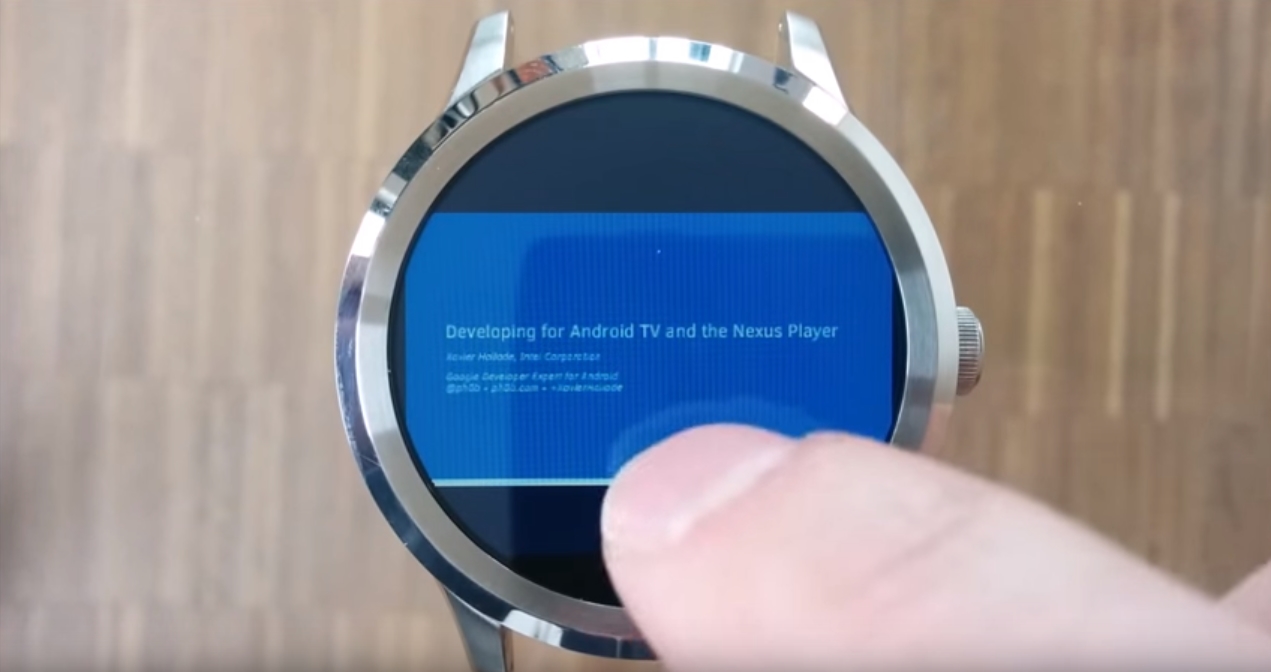
A new app called Document Viewer for Android Wear was recently released by appfour, and you’re probably either excited or rolling your eyes. I’m definitely in the latter category. But then again, most times developers have tried to take apps that typically require a decently sized screen and shrink them to the size of teeny tiny Android Wear, the results haven’t been great. I’m looking at you, emulators that are definitely cool–proofs–of–concept-but-completely-impractical.
This one may not be as ridiculous as running a PSP game, but I’d say—and I mean absolutely no offense to appfour—it’s very unlikely to become an app you use daily…

For me, coffee at Starbucks is secondary to the great music you discover courtesy of your twenty-something barista’s Spotify DJ skills. The good news is you can now easily save those Spotify playlists for listening later through an update to the Starbucks Android app today.
Expand
Expanding
Close

Today, Facebook announced that it is bringing Tor support to its Android app, a couple years after the company decided to make Facebook available directly over the Tor network in October of 2014. Facebook says that “a sizeable community of people” are using the site over Tor, so bringing the feature to mobile via Android seems like the next logical step…
From a good Material Design interface to implementation of new Android features, Pocket Casts is one of the best apps on the Play Store. The podcast player received an update today that added improved voice controls, Marshmallow support, and date-based filters.
WhatsApp’s founder Jan Koum has announced today that the widely-used messaging service is now free to customers. The Facebook-owned company is dropping its subscription service immediately. While it’s only 99 cents per year to use WhatsApp‘s multi-platform messenger app, Koum states that the annual subscription was still a barrier to some users…
Google Drive’s web interface has been updated with a few tweaks to make it easier and quicker to organize files. A more prevalent ‘Move’ icon helps users place files into folders from anywhere.
Google, Luke Wroblewski has shared some information on a new version of the Google Plus app which should be rolling out to the Play Store over the next couple of days. The G+ update will take the social networking app up to version 7.0.0 and includes a number of requested new features, as well as a boatload of bug fixes.
In the latest version of Google’s Android app, users should notice that the bottom tab bar is automatically hidden whenever they’re scrolling up or down any page (except the notifications screen). It may seem like a minor design change, but it does free up more screen real estate for actual content, and makes the app look a lot less cluttered.
Another new useful feature (which I can’t quite believe wasn’t already there) is the autocomplete suggestions which show up as you type in the search bar. As well as that, the home stream will now remember your position if you happen to go to a different screen within the app, so you don’t have to scroll down to find where you were when you return to it.
Lastly, along with the 69 bug fixes and 14 accessibility issues that were addressed, the new Google Plus app places a prompt on your profile to add a Collection or Community if you don’t have one. As we all know by now, Google Plus is now all about the Collections and Communities.
The updated app is available on the Play Store from today. If you have it installed, the update should show up on your device over the next day or two, if it hasn’t already.
Pushbullet can finally send picture messages (MMS) from your computer. The long awaited feature was just introduced in the first big update of the year along with increased SMS readability.
Update 1/13: In another update (version 5.8.47.19), the normalized app icons were removed and are now back to their original size. The feature was likely just a bug. This update also fixes the gap between the favorites tray and onscreen buttons in landscape and the non-grayed out buttons when the launcher is opened.
The Google Now Launcher received quite a few updates in version 5.8.45.19 of the Google app. The launcher, which resides within the Google app, now has landscape orientation and normalizes the size of app icons.
Update: Google has officially announced the feature and clarified that Driving Mode will only suggest your home, work, and other recently searched for destinations.
An update to Google Maps for Android adds a new intelligent ‘Driving Mode’ that predicts where you’re heading in order to provide driving updates. Additionally, the update adds more prominent controls for audio feedback and granular privacy settings to the Timeline feature.