Android

See All Stories

Breaking news for Android. Get the latest on apps, carriers, devices, and more!
Android is Google’s mobile operating system, launched in September 2008, although its history technically began with the release of the Android alpha in November 2007. To this day, Android powers the majority of the world’s smartphones and comes in several different flavors across many phone makers.

What is Android?

Android Inc.

Android, before it was Android, was a company called Android Inc. That company was founded in Palo Alto, California, in 2003 by a crew of four: Andy Rubin, Rich Miner, Nick Sears, and Chris White. The company and its project was acquired by Google in 2005 for a sum of more than $50 million, although the exact number is unknown. The company’s founders joined Google as part of the deal.

In its infancy, Android was an operating system built not for touch screen smartphones like the iPhone, but rather BlackBerry-like devices with physical keyboards. It’s well documented that after Apple shocked the world with the iPhone, ahead of its nearest competition by at least a couple years, Google and Android Inc. had to go back to the drawing board to build something competitive.

Adoption by third-party makers

It didn’t take long after the launch of the iPhone for various manufacturers to enter the market with their alternatives — and Google’s Android immediately became the obvious platform of choice for just about everyone except Microsoft. HTC was the first manufacturer on board, and introduced the T-Mobile G1 running Android in September 2008. Soon after, HTC, Motorola, Samsung, and carriers like Sprint and T-Mobile jumped on board to form the Open Handset Alliance.

Android makers across the world

Iconic Android handsets

There have been thousands of Android phones released since Android’s inception, but some have been more important to the platform’s history than others. There was the original T-Mobile G1, as mentioned, but there was also the HTC One Google Play Edition, Moto G, Samsung Galaxy S4, and others. Some of the most iconic Android handsets include:

  • HTC G1
  • HTC Nexus One
  • Samsung Galaxy S, S2, S3, S4, and their successors
  • HTC Incredible S
  • Samsung Nexus S
  • Samsung Galaxy Nexus
  • Samsung Galaxy Note
  • Nokia 8
  • BlackBerry KeyOne
  • Google Pixel and its successors

In more modern times, there are several Android smartphones makers that popped up across various niches and in several international markets. Huawei is a dominant Android maker in China and many European markets, while Samsung is by far the most popular maker in the United States by far — effectively creating a duopoly with Apple. Today, there are dozens of major device makers contributing to the Android ecosystem.

Full list of Android OEMs

History of major Android versions

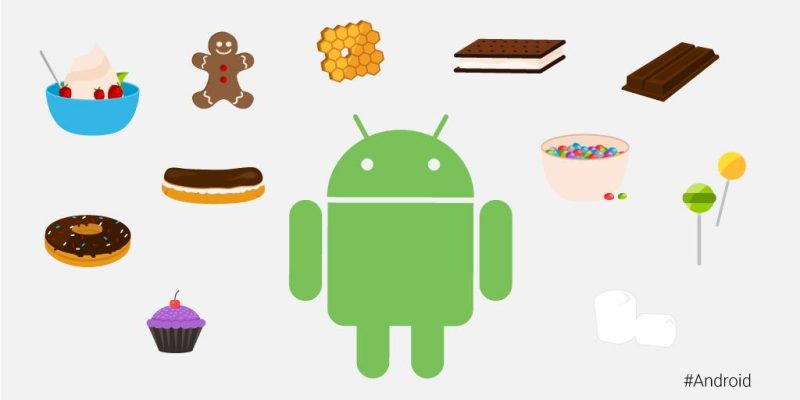
Android has seen countless software revisions over the course of its life, but in modern times the OS usually sees a major release on an annual cadence. In the earlier days, Google famously gave its major software releases dessert-themed codenames, but retired that practice in 2019 with the release of Android 10.

VersionNameReleaseDevices
2.3GingerbreadFebruary 9, 2011Nexus S
4.0Ice Cream SandwichOctober 19, 2011Galaxy Nexus
4.1Jelly BeanJuly 9, 2012Nexus 7
4.2Jelly BeanNovember 13, 2012Nexus 4, 10
4.3Jelly BeanJuly 24, 2013Nexus 7 (2013)
4.4KitKatOctober 31, 2013Nexus 5
5.0LollipopNovember 3, 2014Nexus 6, 9
5.1LollipopMarch 9, 2015Android One
6.0MarshmallowOctober 5, 2015Nexus 5X, 6P
7.0NougatAugust 22, 2016Nexus 5X, 6P
7.1NougatOctober 4, 2016Pixel, Pixel XL
8.0OreoAugust 21, 2017Pixel, Pixel XL
8.1OreoDecember 5, 2017Pixel, Pixel XL
9PieAugust 6, 2018Pixel 2, Pixel 2 XL
1010September 3, 2019Pixel 3, 3a
1111September 8, 2020Pixel 4

List of major Android OS platforms

While Android proper is certainly the most widespread of Google’s Android operating systems, the company has also launched many offshoots of the main OS over the years. There’s Android Auto, Android Wear (now Wear OS), Android TV (now rebranded to Google TV), as well as versions of Android built for tablets and Android Things (now defunct).


Imgur releases its first ever native Android app with card-based interface, more

Site default logo image

In addition to updating its iOS app, Imgur this morning has also unveiled an entirely new version of its Android app. Imgur says that this is its first ever fully native app for Android users and was built completely from scratch. The app features a redesigned card-based gallery that offers large and easily viewable images. Users can navigate throughout the interface by swiping left or right to view more content.


Expand
Expanding
Close

9to5Toys Lunch Break: Galaxy Note 3 (unlocked) $265, Acer Chromebook 15 $336, Chromecast $24, more

Keep up with the best gear and deals on the web by signing up for the 9to5Toys Newsletter. Also, be sure to check us out on: TwitterRSS FeedFacebookGoogle+ and Safari push notifications.

Today’s can’t miss deals:

Samsung Galaxy Note 3 32GB (unlocked): $265 shipped (Reg. $500)

Acer Chromebook 15 C910-C37P 16-Inch Chromebook: $337 shipped (Reg. $400)

Google Chromecast (refurb) $24 shipped (Reg. $35) + free movie rental, UFC Fight Pass, and more

Samsung Class 10 microSD Flash Memory Cards w/ Prime shipping: 16GB EVO $7 (Reg. $15), 32GB Pro $18 (Reg. $37)

Kindle for Kids Bundle: Kindle e-reader + kid friendly cover + 2yr. warranty $99 shipped ($140 value)

GoPro’s new HERO+ LCD brings a touch display to its entry-level action camera

Father’s Day Gift Guide: top picks, exclusive discounts and a $482 giveaway

More new gear from today:

Daily Deals: Samsung 55″ Smart HDTV $800, Foldable Bluetooth Keyboard $27, more

More deals still alive:

PlayStation Plus free games for Junes: Metal Gear Solid V Ground Zeroes, more

Xbox Live free games for June: Massive Chalice, Just Cause 2, Thief, more

New products & more:

Splatoon for Wii U inks the scene with colorful gameplay and an exclusive bundle

Android Lollipop adoption inches past 12% in May, KitKat and Jelly Bean still holding strong

It’s the top of the month, and that means it’s time for another update from Google on Android’s adoption numbers. Lollipop, the latest release, has just in the last 30 days crept up to pass 12% adoption, following an overall market share of 9.7% that 5.0 and later had at the beginning of last month. Specifically, Android Lollipop now has 12.4% of the Android market.
Expand
Expanding
Close

Site default logo image

Microsoft reportedly buying cross-platform to-do list app Wunderlist

You can now add the German mobile app firm 6Wunderkinder GmbH to the growing list of companies with Android apps that Microsoft has bought in recent months. 6Wunderkinder makes the popular cross-platform Wunderlist task manager for Android. According to The Wall Street Journal, Microsoft has spent somewhere in the ballpark of $100-$200 million for the firm.
Expand
Expanding
Close

Site default logo image

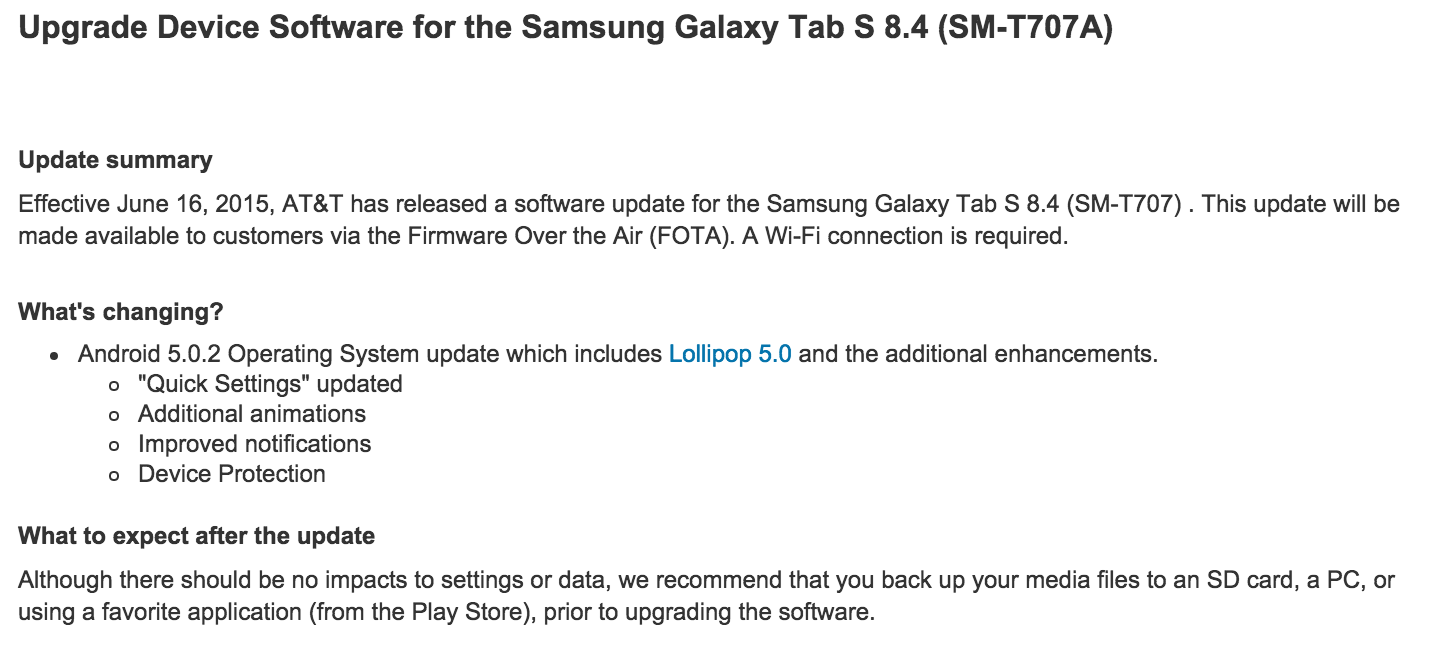
Verizon’s Galaxy Tab S 8.4 LTE receiving OTA update to Lollipop

As first reported by Android Police and listed on a Samsung support page for the Galaxy Tab S 8.4, it seems that Verizon’s variant of the tablet is now receiving an OTA update to Android 5.0.2 Lollipop.

The software version for the Galaxy Tab S 8.4 becomes T707VVRU1BOD4, and to check if the Lollipop update has reached your device you need to open your Settings app and select About device.

We would’ve hoped this update would be to 5.1.1, as earlier 5.0 versions have been known to cause a bevy of problems for many devices, but alas we can only hope that Samsung did extensive enough testing to fish out any significant problems.

Pro tip: Chrome already has similar granular permission controls to Android M

Site default logo image

One of the big additions to Android with the unveiling of Android M last week is more granular permission controls, allowing developers to ask for access to things like the microphone or GPS only once they need them, and for users to be able to revoke one or all of these permissions when they’d like. What wasn’t discussed on the keynote stage, however, is that the Chrome browser already has these features. Here’s how to use them:


Expand
Expanding
Close

Site default logo image

OnePlus One drops to $249 this week with flash sales

We can’t be sure whether or not this was what OnePlus meant when they said they’d “shake up the industry” on June 1st, but either way the company is holding flash sales on the OnePlus One at different times today through this Sunday, June 7th.

Here’s the full schedule of the next times the sale will go live:

June 2 – 2:00 GMT (10 pm EST -1 day)
June 3 – 12:00 GMT (8 am EST)
June 4 – 2:00 GMT (10 pm EST -1 day)
June 5 – 12:00 GMT (8 am EST)
June 6 – 2:00 GMT (10 pm EST -1 day)
June 7 – 12:00 GMT (8 am EST)

During the flash sales (devices may go fast, so you’ll have to be quick) OnePlus is offering the 16GB Silk White OnePlus One for $249 and the 64GB Sandstone Black model for $299. That’s a pretty good steal for a solid alternative to the Nexus 6, which was priced unusually higher than its Nexus predecessors.

OnePlus long ago confirmed that they were working on the OnePlus 2 and said it was slated for “sometime in 2015,” but that’s all we know about that device.

How to install Android M developer preview factory image on Nexus 5, Nexus 6, Nexus 9, and Nexus Player

Google finally introduced to the world the next version of Android, dubbed Android M for the moment, at its Google I/O developer conference in San Francisco. And while the currently-available version may be a developer preview (and those who are developers likely wouldn’t need this guide), many who aren’t as familiar with how to flash factory images might want to try the latest build of the mobile OS as well.

That’s why we made this guide. If you have the Nexus 5, Nexus 6, Nexus 9, or Nexus Player (and possibly others in the future), there’s a build of Android M available for you to install prior to the update’s official unveiling later this year. Be warned however, as this is a very early build of the OS and is riddled with bugs, glitches, and overall performance jankiness. If that doesn’t sway you, though, keep reading…
Expand
Expanding
Close

Report: Nintendo’s next-generation NX games console may run Android [Update: Nintendo denies]

Site default logo image

Update: The WSJ is reporting that Nintendo has denied the suggestion:

There is no truth to the report saying that we are planning to adopt Android for NX

Nintendo has been keeping quiet about its plans for its NX games console, due to launch next year, but a report in Nikkei claims that the system will run Android.

The report suggests Nintendo is planning the shift away from its own operating system as a means of bringing more games developers on board after the Wii U was left with almost no non-Nintendo titles available for it … 
Expand
Expanding
Close

Asus adds high-end 8-inch model to its tablet range, now branded ZenPad – and the ZenPhone Selfie

Site default logo image

Alongside the ZenWatch 2, Asus has also announced a flurry of new tablets – now using the Zen branding – and a new ZenPhone.

The highlight, and the only tablet Asus talked about in any detail, is the ZenPad S 8.0, an 8-inch model with impressive specs. The metal body contains a 64-bit Intel Atom Z3580 processor, 4GB RAM, hi-res 2048×1536 IPS display in 4:3 ratio, up to 64GB storage – and a shiny new USB Type C connector … 
Expand
Expanding
Close

Asus gives us our first look at the ZenWatch 2 – but no specs, price or availability yet (Video)

Site default logo image

Asus confirmed last month that its next-generation ZenWatch was on the way, and would be released in Q3 this year. It has now shown off the Asus ZenWatch 2 for the first time – though not told us very much about it beyond the looks.

It will be available in two sizes, 49mm or 45mm, and offer a total of 18 different looks via three color choices for the watch itself and a range of straps. You can choose between silver, gunmetal and rose gold casings, each with matching stainless steel link bracelets, with leather and rubber strap options too … 
Expand
Expanding
Close

Site default logo image

Google Play Store now displaying age-based ratings

We reported back in May that Google was adding age-based ratings to all apps in the Play Store as determined by the International Age Rating Coalition (IARC), and now it seems those ratings are starting to appear like in the example above.

Some apps display “Unrated” where the rating should be, which either means the developer didn’t complete the surveys Google asked them to by the beginning of May, or the IARC hasn’t finished rating all apps in the store yet. Google warned in the announcement of age-based that by not completing these simple surveys about their apps by May, developers would risk having their apps blocked in some territories.

The IARC ratings will vary by region, as different territories like the EU and United States have their own participating bodies in the IARC who set their own standards – the ESRB in the US, for example –but they shouldn’t vary too widely. Below are the ratings for the United States.

  • E: Suitable for all ages but “May contain minimal cartoon, fantasy or mild violence and/or infrequent use of mild language.”
  • E10: Suitable for everyone age 10 and up.
  • T: Suitable for teens age 13 and up, may include crude humor and minimal blood, simulated gambling and the possibility of strong language.
  • M: For age 17 and up, may include intense violence, blood and gore, sexual content and strong language.
  • AO: Adults only, ages 18 and up. Intense violence, graphic sex and gambling with real money.

Google says age-based ratings “will give developers an easy way to communicate familiar and locally relevant content ratings to their users and help improve app discovery and engagement by letting people choose content that is right for them.

The new ‘Google Photos’ is a convincing reason to give Google your entire photo library

Site default logo image

Google Photos was just announced this week, and—assuming you’re okay with Google having all of your photos on their servers—it’s a great new way to keep all of your life moments safely stored in one place. This isn’t just a redesigned mobile app. It’s a complete rethinking of how Google approaches its photo storage offerings, and it already has me convinced to just throw every picture I’ve ever taken to their cloud…
Expand
Expanding
Close

Hands-on with Google ATAP’s Project Jacquard (Video)

ATAP’s Project Soli and Project Jacquard are two of the more exciting announcements to come out of Google I/O, and while Soli didn’t have any impressive demos on the show floor, Google’s advanced technology and projects group had some touch-able fabric out for us to give Project Jacquard a test run. So we did, and we grabbed a quick video…
Expand
Expanding
Close

Qualcomm announces Project Tango smartphone platform powered by Snapdragon 810 processor

Site default logo image

Google’s Tango tablet

Earlier this week, Google made its Project Tango tablet available to everyone via the Google Store for $512. While many expected this price drop and public availability to lead to a successor at Google I/O, the company kept quiet and didn’t address its Tango initiative. Nevertheless, Qualcomm this evening has taken the wraps off of its own Tango smartphone platform powered by the Snapdragon 810.


Expand
Expanding
Close

Google Cast has received new APIs for second-screen functionality, autoplay, queuing, more

Site default logo image

Google’s Chromecast dongle for pushing digital content from ones phone, tablet, or laptop to a TV screen isn’t exactly a high-end device – the full retail price is $35, and it’s on sale constantly – but its unexpected to many been a huge success for the company. Over 17 million of the dongles have been sold, the Cast button has been pushed over 1.5 billion times, and Google says Chromecast users consume 66% more content per day than when the device launch in 2013. To push the network of Cast buttons and supported content even further, Google has released some new APIs for developers to build richer experiences.


Expand
Expanding
Close

Google ATAP hopes its Project Soli and Project Jacquard will change how we interact with wearables

We told you yesterday that Google’s ATAP team is working on a couple new projects dubbed Soli and Jacquard, and today the group of self-proclaimed “pirates” came out to officially announce (and demo) them both on stage at their much-anticipated Google I/O session. They’re both about reimagining how we interact with technology, but both projects attempt to do so in different ways…
Expand
Expanding
Close

Site default logo image

Smart Lock Passwords is hitting pre-Android M devices now, web interface live

We reported earlier today that support for Smart Lock Passwords, a new cross-platform password manager tool for Android and Chrome/OS, was already beginning to hit major apps including Netflix. Now it seems that the greater rollout is pushing on quickly, with the web interface now live and reports spreading that Smart Lock Passwords is showing up in the Settings app of Android 5.1 Lollipop devices for some owners.

By visiting passwords.google.com you can toggle Smart Lock for Passwords on and off depending on whether or not you want to save app and website passwords to your Google account. The benefit of using Smart Lock for Passwords, especially if you’re a Google loyalist, is that it’s a simple, clean way to save login credentials for all the apps and websites you visit using Chrome and Android and log in automatically. I also imagine it’s a scary addition for apps like 1Password which, while now have many other features to differentiate themselves, initially built their businesses off saving login credentials in one place. Saving login credentials and not other things like credit card details and drivers license info is probably enough for the average person, too.

As mentioned above there have also been reports of Smart Lock Passwords hitting the Settings area of some Android phones running newer versions of Android 5.0 and Google Play Services. This would lead us to believe that it’s either a server-side change or Google had hidden Smart Lock Passwords in a recent version of Play Services, but it’s probably the former. Here is what that looks like courtesy of AndroidPolice:

Be sure to watch out for the change and let us know if Smart Lock Passwords hits your device.

Google’s quietly announced ‘Hands Free’ app is Android Pay without taking out your phone

Site default logo image

The newly-announced Android Pay is pretty cool – it allows you to pay at retail stores and inside mobile apps without having to take out your wallet or punch a bunch of card details into your glass-screened phone. But the logical conclusion to reducing the friction of paying for things is not tapping my phone against an NFC reader, but rather just not having to take out my phone at all! Well, without the same fanfare that was given to Android Pay, Google said they’ll have a solution for just that.


Expand
Expanding
Close

Site default logo image

Google has partnered with Udacity to offer a nanodegree in Android development (Update: live June 3 Q&A)

Update: Google is holding an “Ask the Experts” session today, June 3rd, at 2PM PDT where Sebastian Thrun, Peter Lubbers, and Jocelyn Becker from Udacity and Google will be answering user-submitted questions about the Android Nanodegree program. The Q&A session will be live-streamed on YouTube and there’s also a form where you can submit any questions you may have.

Yesterday Google’s Sundar Pichai said on stage at the company’s I/O conference that 8 out of every 10 phones that shipped worldwide last year were running Android, and that 600 million new smartphone users came online over the past year. That’s a lot of devices running the company’s smartphone OS, and they really want developers to realize the potential of their apps reaching that many people. So much so that they spent over $4 million developing an extensive Android development course in partnership with Udacity.


Expand
Expanding
Close

Google highlights best-in-class app designs with Material Design Showcase & Awards

Site default logo image

[youtube https://www.youtube.com/watch?v=Xtu7ZOQScrI]

As part of Google I/O week, the company is highlighting a number of Play Store apps that use Material Design in different ways. To do this, Google is launching the Material Design Showcase on the Play Store and issuing Material Design Awards to select apps for the first time.
Expand
Expanding
Close

Site default logo image

Thanks to USB Type-C support in Android M, you’ll soon be able to send power in both directions

Android VP of Engineering Dave Burke’s presentation on Android M yesterday saw quite a few huge new additions coming to the OS from granular app permissions to improved battery standby management and, of course, Android Pay (check out our roundup). But one thing that might have got lost in the noise for some of you was Google’s newfound embrace of the USB Type-C standard and what it will actually do for you in practice.

USB Type-C is both flippable and bi-directional. That first attribute means that you won’t have to fiddle in the dark with plugging the USB cable connector into your phone the right-side up, because there isn’t a right-side up with Type-C.

More interesting, though, is the bi-directional ability of USB Type-C and Android M’s new interface support for it. What this means in theory is that, while this wouldn’t be practical, you could connect your Android phone to your laptop and charge your laptop with your phone instead of the other way around. You can also send files in either direction as was obviously possible before, but the new interface you see above for managing all these abilities in one place looks quite convenient.

Finally as you might be able to make out from the image above, Google is ready to welcome in more musicians with the warm embrace of MIDI support. This is big because while because 5.0 Lollipop brought support for some audio devices like USB microphones and amplifiers, it left out a lot of musical instruments that use the MIDI standard to send data back and forth between other devices. Maybe this will encourage more musicians and music app developers to consider Android again.

Netflix Android app adds support for Google’s new Smart Lock password manager

Site default logo image

Yesterday, as part of the company’s Google I/O dev conference keynote presentation, Google took the wraps off Smart Lock, a new password manager that makes logging into apps in Chrome or on Android much more painless. Now, some of the first apps to support the new feature are being updated starting with Netflix.
Expand
Expanding
Close

Site default logo image

This is what text selection actions look like in Android M

There was a lot to digest in today’s Google I/O keynote but one small, interesting new behavior change of note going into Android M is a new text selection floating toolbar, as you can see in the GIF above.

Whereas in the past primary actions of Cut, Copy, Paste, as well as other app-specific actions related to selecting text would probably be saved for a contextual action bar (an example of which is below), developers who want to keep their apps up-to-date with platform changes will now utilize this new toolbar which appears just above the text selection area. As you can see above, pressing the More icon will reveal a secondary menu where developers can add their own extra actions; the company in its design documents provides the example of Share, Search, and Translate actions appearing within the secondary menu in Gmail.

Another interesting system behavior change in Android M is a battery management tool called “Doze,” which we detailed in our Android M roundup, that disables most background activities when the OS detects that the device has gone unused for an extended period of time. The company says this has resulted in upwards of 2x longer standby time for Android devices running M versus those running Lollipop.