Stay up to date on news from Google headquarters. Be the first to learn about plans for Android, Google Plus, Google Apps, and more!
Stay up to date on news from Google headquarters. Be the first to learn about plans for Android, Google Plus, Google Apps, and more!


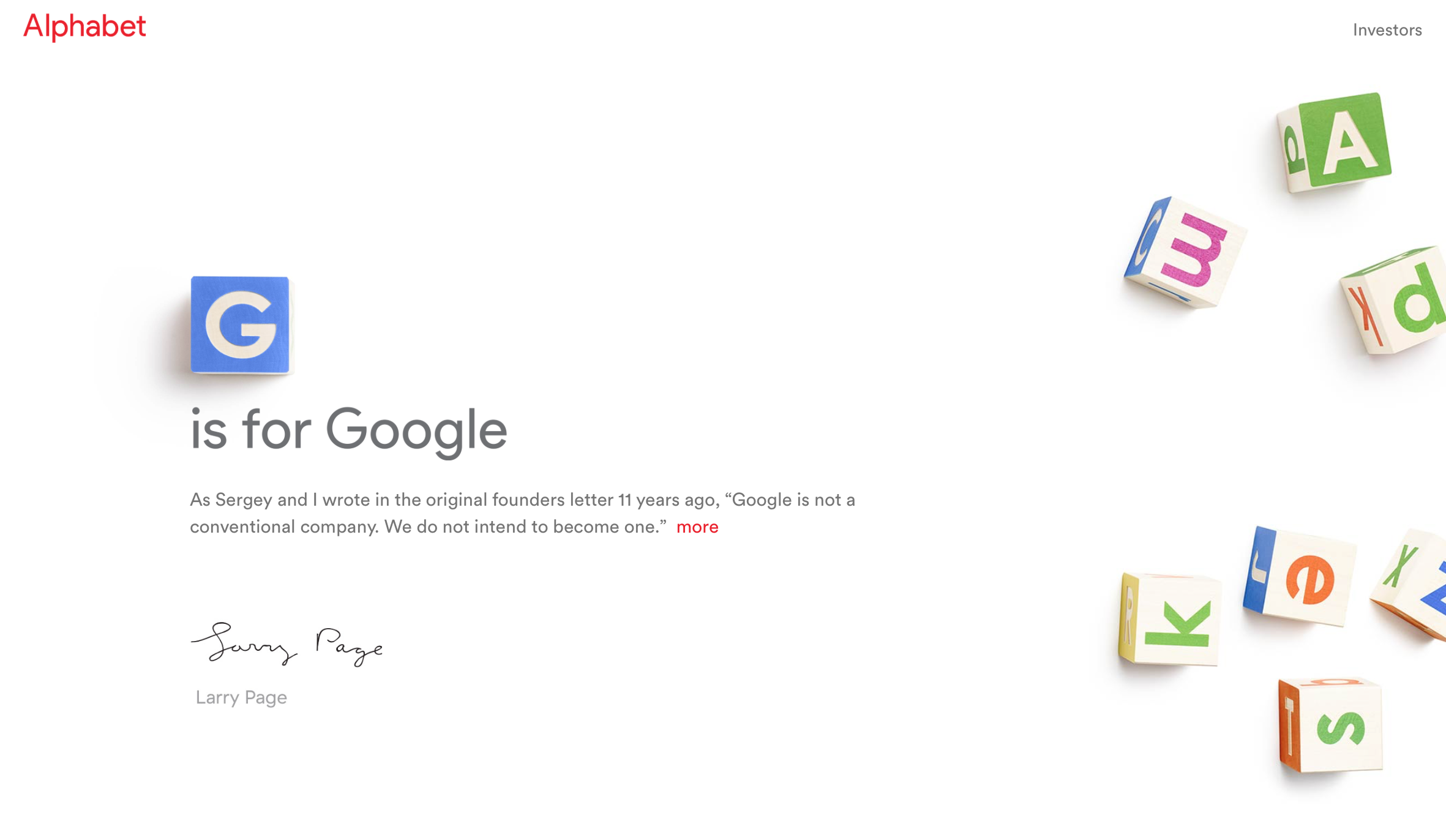 With the announcement that Google has completely reorganized its entire business under a new parent company called Alphabet, there are still many questions floating around about what products belong with what companies now.
Thanks to Google’s SEC filing, we’ve got some answers on that front.
Google has announced a major restructuring of the entire organization, starting with the creation of an all-new company called Alphabet, Inc., which will now serve as the parent company of Google and all of its previous projects.
The Google brand will be “slimmed down” and focus on web products like Search and Gmail, with SVP of Android/Chrome/Google Apps Sundar Pichai serving as CEO. Other endeavours like health research, will belong to other companies that will be broken out of Google.

Keep up with the best gear and deals on the web by signing up for the 9to5Toys Newsletter. Also, be sure to check us out on: Twitter, RSS Feed, Facebook, Google+ and Safari push notifications.

As countless manufacturers of Android devices line up to release patches for the “worst Android vulnerability in the mobile OS history,” as some researchers have described it, the Galaxy Note Edge and Note 4 on Verizon are next up.
The vulnerability patch for the Galaxy Note Edge was spotted on Verizon’s support site by Droid-Life, then owners of the Note 4 reached out to the site to share that their devices are receiving a security update as well.
Verizon’s support document for the Note Edge security update is comically short at only one page long — their software update PDFs are usually at least a couple of pages long. We haven’t seen a similar document for the Note 4 yet.
For those who don’t know, Stagefright is what researchers have named a vulnerability that can see malicious software delivered to a device through MMS text messaging and executed automatically, as most messaging apps on Android automatically download rich media sent via MMS, regardless of whether or not the receiver opens the message. Google’s Messages and Hangouts apps both include the ability to disable auto-fetching of MMS content, though, and it’s pretty easy to toggle off.
We first gave Cortana beta for Android a try a few weeks ago, and I just wasn’t impressed. Our own Cam Bunton went on to give it a deeper look and a comparison to Google Now and was a little less cynical than I, but overall neither os us were convinced that it is something that Android users need. I would argue that that’s still the case, but Microsoft clearly hasn’t given up yet. With a recent update to the app, you can now set Cortana as the home button shortcut.
Expand
Expanding
Close
Yes, the day many have been waiting for in eager anticipation is finally here: Google has officially announced in a blog post that Hangouts version 4.0 goes live in the company’s Play Store today.
Expand
Expanding
Close
Google today announced at SIGGRAPH 2015 that it plans to bring Vulkan, a 3D rendering API, to Android. You can read more about the new API over the Android Developers blog, but here’s the gist:
In order to address some of the sources of CPU overhead and provide developers with more explicit control over rendering, we’ve been working to bring a new 3D rendering API, Vulkan™, to Android. Like OpenGL™ ES, Vulkan is an open standard for 3D graphics and rendering maintained by Khronos. Vulkan is being designed from the ground up to minimize CPU overhead in the driver, and allow your application to control GPU operation more directly. Vulkan also enables better parallelization by allowing multiple threads to perform work such as command buffer construction at once.
Android has long supported OpenGL, and now Google is introducing Vulkan to hopefully combat some of the sources of CPU overhead. The company says that it will give developers “more explicit control over rendering,” and will enable “better parallelization”.
Google says that it’s working hard to “help create, test, and ship Vulkan,” but also plans to continue supporting the simplicity of OpenGL ES. You’ll be able to choose which API is right for you, and Google says that it is committed to “providing an excellent developer experience” either way.


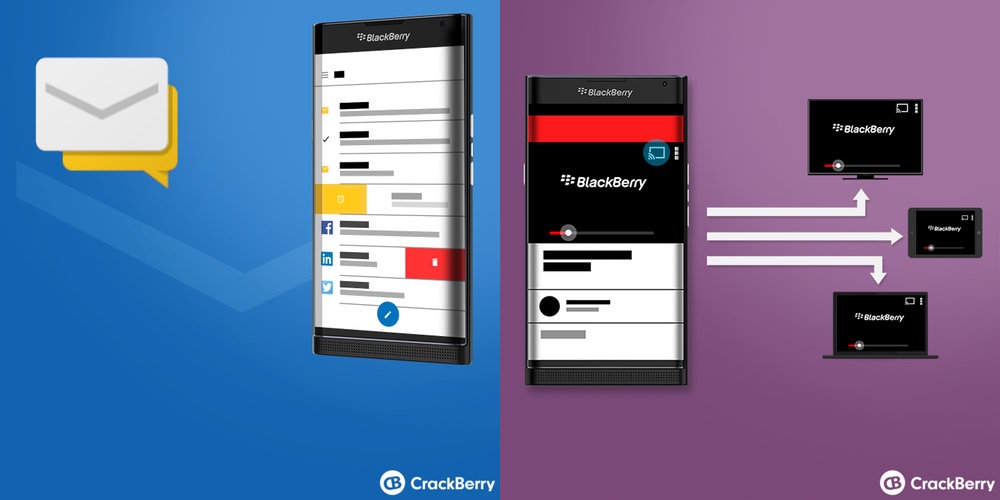
We’ve been hearing a lot about BlackBerry’s long-rumored Android smartphone over the past few months. In fact, almost as soon as BlackBerry teased the ‘Venice’ slider back at MWC in Barcelona, it was rumored that the upcoming device would ship with Google’s OS onboard. A previous render showed a pretty clear image of Android running on the BlackBerry slider, and now some more official-looking images appear via CrackBerry to hint at a Google-powered system.


Google is making a “massive” investment in its Android One program, designed to make pure Android devices available to customers in developing markets at affordable prices, reports the FT. It hopes “over the next few years” to bring down the retail price of Android One handsets in countries like India from the equivalent of $100 to somewhere in the $30-50 range.
Rajan Anandan, managing director in India and Southeast Asia, told the Financial Times that the company [recognized that the] much-hyped mobile standard had “not delivered to expectations” …
iOS users of Google Maps just got some new functionality that has been in the Android version for some time now. Version 4.9 (iTunes link) brings a new night mode as well as the ability to label custom places so they can be easily found on the map and in search.
Night mode does something pretty common amongst dedicated GPS navigation units: It darkens the maps on-screen while you’re navigating somewhere. The reason this matters is because distracted driving is one of the biggest causes of driving-related accidents, and the white glow of a smartphone screen directed at ones face at nighttime can most definitely make it difficult to see what’s in view of the vehicle.
The other notable addition to come with this update is the ability to label places on the map that aren’t already in Google’s own database of places and points of interest. It’s already possible for anyone to add new places to the map through the iOS app, but these were only for public places and, if approved, would be seen by everyone using the app. The new labels are private, intended to make it easier to find and navigate to places that matter to you.
Google Maps for Android already has these features, but for iOS users who still cannot stand Apple’s own mapping product, they’re surely a welcome addition.
Update: Yes, it’s real.
Evan Blass of evleaks has a pretty solid track record, and we’ve cited his leaks hundreds of times. This time, though, we can’t tell if what he has leaked is a joke or if it’s actually a real product on the way from Samsung. As you can see above, it looks like the Korean company might maybe possibly eventually release a keyboard cover for the yet-to-be-announced Galaxy S6 Edge+.
Knowing Samsung, this could very well be the real deal. And Evan hasn’t exactly been known to be a jokester when it comes to his leaks. He’s ended up wrong a couple of times, but I can’t remember many times that he has just posted a “leak” that was purely a practical joke. With that in mind, I have to say that this cover looks absolutely horrid — and useless.
S6e+ keyboard cover — clever. pic.twitter.com/4eAJKPq9ph
— Evan Blass (@evleaks) August 7, 2015
A physical keyboard is something that many have desired since the move away from BlackBerry-esque devices, but I don’t know if this is the solution. I would much prefer that some companies — like BlackBerry, maybe? — make a smartphone that actually has a physical keyboard built-in. This hunk of plastic covering up half of your screen is surely be a nuisance and nothing more.
I recently reviewed the ASUS ZenFone 2, and — like many others — had mostly great things to say about it. The phone has been a success for ASUS, a company which has previously had trouble getting any respect or recognition for any of its Android entries. That changed with the ZenFone 2 at CES 2015, when the company announced that the higher-end model, the one that I reviewed, would be shipping with 4 GB of RAM. In the real world, having 4 GB of RAM over the typical 3 GB doesn’t make much difference, but it was impressive nonetheless. Now, ASUS is taking a step back. They’ve taken the ZenFone 2 and gone the opposite direction, introducing an AT&T GoPhone variant of their flagship. And it’s pretty much exactly what you’d expect…
Real world, on-the-fly language translation has always been a little gimmicky if only because it still doesn’t quite hit the mark in terms of accuracy. Human spoken languages are a lot different from computer code in that words can have many meanings based on the context of the other words surrounding them. But that hasn’t stopped Microsoft from releasing its own translation app for Android called Microsoft Translator.
As you can see from the images above, the app is pretty simple. You speak or type in some words you want to translate, then choose the language you want to translate them into. You can save the translated result for later by pinning it, and then come back to it when you really need it — say, if you’re hitting a vacation town for the evening and need some common phrases to help you get around.
Unlike Google Translate, Microsoft Translator has a companion app for Android Wear so you don’t have to pull out your phone to make a new translation or access your pinned translations. Google Now can do some short translations, but nothing very long from my experience. Where Google Translate may lack, however, it makes up in a conversation mode which requires less tapping of the microphone to translate the voices of two people having a conversation — something Microsoft’s solution does not do.
Microsoft Translator, the underlying translation technology powering the app, supports just over 50 languages (yes, including Klingon), and Microsoft periodically adds new languages. The company says that the most important data its translation tools need to accurately translate languages on-the-fly is a lot of existing translations — 1 million translations of the same text into two languages, approximately.
Clearly, though, the new Wear app in particular is an experiment for Microsoft. From their blog post on the launch:
Wearables are a fascinating place to understand user experiences for translation. No other type of device allows people to interact with so little physical intrusion from the device itself— PC’s, tablets, and even phones can be occasionally awkward and unnatural in the middle of a conversation. With these smart devices, we want to learn how people use the apps and how effective the translation experiences can be. By integrating translation capabilities into devices that are instantly on hand (pun intended), we hope to continue to break down the last barrier in human communication— language.
The major Android manufacturers seem to at last be getting serious about security. Following the recent discovery of the Stagefright vulnerability, Google announced that it would commit to issuing monthly security updates to Nexus devices for at least three years. Samsung yesterday said that it too would do the same, though without stating how long it would continue to support older devices. LG has now joined in, reports Wired.
LG will be providing security updates on a monthly basis which carriers will then be able to make available to customers immediately.
Other manufacturers have also responded quickly to Stagefright, with HTC, Sony and Android One among the groups to be issuing patches …
Expand
Expanding
Close

From Electrek:
Chris Evans was until recently the head of Google’s Project Zero, a team of hackers employed full-time by Google to find zero-day vulnerabilities on not only their own products, but any software that could affect Google’s users. Today, Evans announced that he will soon join Tesla Motors to lead its security team.

When you’re taking a picture, it’s not rare for obstructions like fences and reflections to make the resulting image less than ideal. Given a few frames, though, shouldn’t it be possible to do some post-processing and eliminate these problems? That’s what Google and MIT have demonstrated in a paper entitled “A Computational Approach for Obstruction-Free Photography”. It’s fascinating stuff.
If you’re taking a picture in a window, it’s pretty common that a reflection of inside the room or car could obstruct what would otherwise be a really nice looking photo. And that’s what this algorithm seems to focus on most. The team demoes several examples of taking several frames, and actually separating the obstructing reflection, leaving a clear image of the background.
It seems to work well with photos taken through fences and other situations too, the end result providing an image of the background as well as a fairly accurate representation of what the obstruction looks like by itself. This could have plenty of applications for everyday smartphone photography, but perhaps for forensic research as well. You’ll just have to watch it for yourself. Hopefully, this tech isn’t far from being added to the Camera app.
Update: The HBO Now APK with Chromecast support is now available to download. It should be rolling out over the next several hours on the Play Store.
Yes, it’s true. Following the service’s introduction on Android and some of Amazon’s platforms a few weeks ago, Google has announced today that HBO is now rolling out support for Chromecast as well.
Expand
Expanding
Close
We’ve been hearing rumors for some time now that Google will partner with Huawei on its next flagship Nexus device. It may seem like a strange choice of manufacturer, but with its influence in China, Google sees a strong opportunity to piggy-back Huawei’s Chinese success and get its own services adopted there.
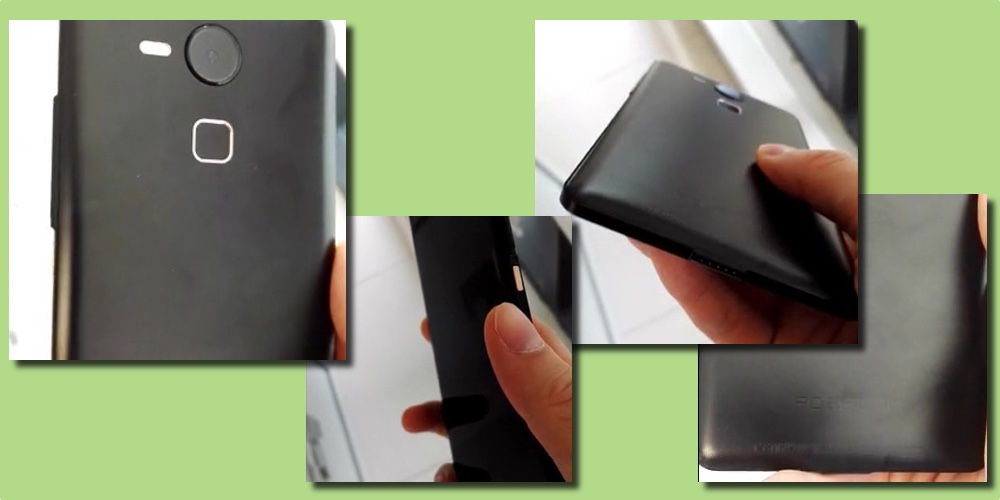
We’re supposedly expecting a device with a 5.7-inch QHD screen and Snapdragon 820 processor to be launched alongside a smaller LG-made device (refreshed Nexus 5 perhaps) sometime later this year. Today, a fresh leak has been published showing little detail, but what could be a prototype of the Huawei-made Pure Google device.
If you check out a few of the snapshot images originally taken from a blurry, unclear video, you’ll notice that the design is fairly similar to another Huawei smartphone. Although there are differences, you’ll see much of the design language is the same as the Huawei Ascend Mate 7:
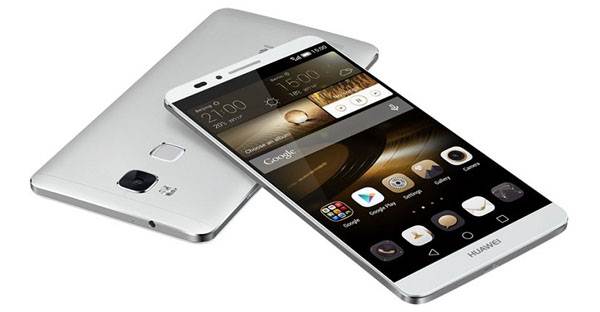
The arrangement of the camera, fingerprint sensor and LED flash units is very similar in both. However, you’ll notice the camera on the supposed Nexus device is round, rather than square (matching the leaked LG Nexus cases). The LED flash is a long pill-shaped component rather than square, but the fingerprint sensor is much the same. Take a look at the original video leaked originally by Steve Hemmerstoffer:
Since the device isn’t powered on at all in the video, it’s hard to say with any certainty whether or not this really is the Nexus being leaked. Or even, if it’s a working prototype. For all we know, it could just be a tested physical dummy unit of a device Huawei is working on. Although, if it is genuine and this is the finished product, let me be the first to say that I’d love that all-black finish on a Nexus device. So dark, and stealthy.

Earlier today, Google announced that it would soon begin improving its security efforts for its Nexus line of devices by rolling out monthly security updates. To go along with that, Google this evening has posted new factory images for seven Nexus devices. The factory images all appear to address the recent security bug that saw “Stagefright” exploited, as well as other fixes.
Google has announced today that, thanks to a recent update to Google Slides, users can now quickly and easily share their presentations over Hangouts video call.
Google Slides helps you share your big ideas with the world, but sometimes presenting these ideas can be challenging. In June, Slides added support for Chromecast and Airplay, which made it easier to project your slides on the big screen. Now there’s another new way to share your work: easy presenting to Hangouts video calls. Teammates, partners, clients and classmates can see your ideas, even if they’re on the other side of the planet.
As you can see in the below video, all you need to get started is an Android phone or tablet. Tapping the play button along the top bar of the app will let you present to a new video call or one that’s already ongoing.
Google has many satellite offices around the world that give it a diverse talent base that may not want, or may not be able, to move to Mountain View to work out of its headquarters. One of those satellite offices is located in the affluent town of Boulder, Colorado, which straddles the Rocky Mountains making it ideal for people who like outdoor activities including hiking and skiing. Earlier this week the company broke ground on a new 330,000 square foot campus to replace its current setup in the town of employees working out of what used to be a Circuit City (remember those?).
Earlier this year Google unveiled its new YouTube Gaming service to rival Amazon-owned video game streaming site Twitch after several months of speculation. Today, Google has released the version of the YouTube Gaming app for Android, albeit in an early “Creator Preview” form. The changelog of the app reveals that the app is capable of many of the features previously announced.
Keep up with the best gear and deals on the web by signing up for the 9to5Toys Newsletter. Also, be sure to check us out on: Twitter, RSS Feed, Facebook, Google+ and Safari push notifications.
Many of us are visual learners, and by visualizing data you may be able to notice trends that you otherwise wouldn’t have by just looking at the numbers written out. Google understands this, and is making it possible to quickly visualize data from its AdWords online advertising service through a simple drag-and-drop tool available soon from directly within AdWords itself — yes, no more needing to download your data and explore it elsewhere.