Google Account

For Safer Internet Day 2022, Google is previewing a handful of new features across several products, including Assistant, Fi, and Account security, and a slew of related initiatives.
Expand Expanding Close

Last year, Google started automatically enabling 2-Step Verification for end users. It has now successfully done so for 150 million people and this 2SV requirement has resulted in a 50% decrease of compromised Google Accounts.
Expand Expanding Close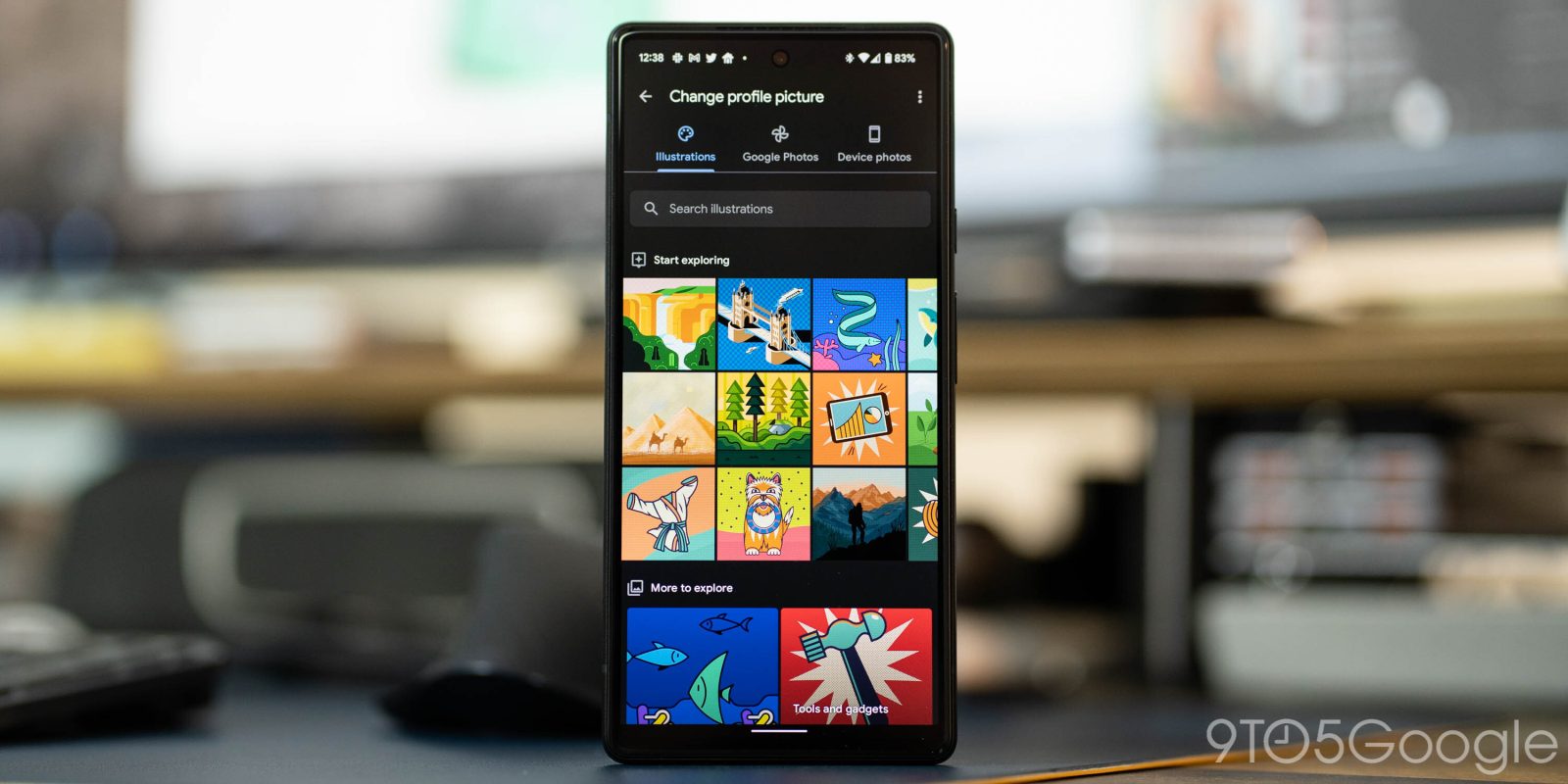

Having a Google Account means customizing it to your heart’s content. That truly becomes the case when choosing a profile picture, since that picture is the face of your account and the thing that everyone sees. Google Illustrations is a tool integrated into Gmail for Android that lets you create custom profile pictures and really spice up your account.
Expand Expanding Close

Back in May, Google said it would start automatically enabling two-factor authentication on eligible accounts. As part of Cybersecurity Awareness Month, Google today provided an update on its account 2SV efforts.
Expand Expanding Close
Google is rolling out two security-related changes that are aimed at simplifying the process of getting 2-Step Verification (2SV) backup codes through a new page and approving permissions on the OAuth screen.
Expand Expanding Close
Besides appearing in the top-right corner of every Google app, your avatar is most prominently used for Gmail. A new “Google Illustrations” tool lets you find and build a custom profile picture.
Expand Expanding Close
Where supported, “Sign in with Google” is a convenient way to log in to third-party services without having to keep track of different passwords. Google is now consolidating its sign-in offerings, which includes the new “One Tap,” under “Google Identity Services.”
Expand Expanding Close
For the past few years, Google has aggressively encouraged adoption of two-factor authentication (2FA) — or 2-Step Verification (2SV) as the company refers to it. This includes physical security keys that plug in over USB, while it also offers phone security keys. The latest effort turns Chrome for Android into a security key for Google Account sign-in.
Expand Expanding Close
Given the service-reliant nature, Google support for Android encompasses multiple layers. One such way is controlling Account access, and Google next month is ending sign-in support for very old versions of Android.
Expand Expanding Close
SMS is widely regarded as an insecure form of two-factor authentication, and another example of this has just emerged. A carrier looks to be injecting ads into the Google verification code used to sign in to services like Gmail.
Expand Expanding Close
Kicked off by I/O 2021, Google has been making a big privacy and security push this week. The Google My Activity page is now adding extra password verification before it shows all your account usage and interactions.
Expand Expanding Close
At I/O 2021 on Tuesday, Google spent part of the keynote talking about privacy and security. It’s following that up with a prominent “We protect your privacy” message in Gmail and Google Photos.
Expand Expanding Close
If you’re not using security keys, the Google Prompt is the next best two-factor authentication method to protect accounts. Google is now updating the Prompt’s Android UI with a much-needed dark theme.
Expand Expanding Close
October is National Cybersecurity Awareness month, with Google yesterday highlighting what Chrome is doing to protect user privacy and security. Today, the company announced a Google Assistant guest mode and in-app critical security alerts.
Expand Expanding Close
Google last May introduced auto-delete controls where your history and activity information is removed after 3 or 18 months. The company today is making this the default behavior across key settings for new users.

Google in recent months has expanded and simplified 2-step verification across first-party services. Security keys for Google Accounts can now be enrolled on Android and macOS.
Last year, Google announced that all Android 7+ devices can be used as two-factor authentication when signing into Gmail, Drive, and other first-party services. Most modern iPhones can now be used as a built-in phone security key for Google apps.

When most people think of web browsers, the usual suspects come to mind — Chrome, Firefox, Edge, Opera, etc. — but over the history of the internet, far more browsers have been created. Recently, people who use some Linux-specific browsers, including Falkon, reportedly found themselves blocked from logging in to their Google Accounts, preventing the use of services like Gmail.
Before today, your Gmail and Google Account profile images could be set independently of each other. Most people might have not been aware of this distinction, and Google is now combining them.
Originally announced as a Chrome Extension, Google is expanding and integrating Password Checkup across two key products. This feature, which checks the strength and security of your saved credentials, is coming to the Google Account’s built-in password manager and the Chrome browser.
Back in March, Chrome introduced a “Sync and Google services” section to bring together all Google-related browser preferences. Chrome for Android now has a shortcut to those settings right on the New Tab page.
Announced at I/O 2019 amid a slew of other privacy commitments, Google Nest is starting the Nest to Google Account migration. An update to the Nest for Android and iOS clients today let you transition, with security and seamless integrations touted as advantages.
To take full advantage of Google services, Web & App Activity and Location History often have to be enabled on an account and device. At the same time, the company has been working to give end users more control over their privacy, and today is introducing an auto-delete feature.
The best way to protect online accounts is with a security key that ensures you’re the one signing in. However, enterprise users still have legacy systems like Internet Explorer or remote desktops that don’t support the new log-in method. Google now has security codes created using security keys for those scenarios.